Level 2
November 20, 2018
Solved

Previewing data in an Email that comes from an Enrichment step

I'm hoping this is the right place to ask this question. We have adobe campaign version 6.1.1

I've built a workflow that creates a segment for an email. The segment uses an enrichment step to get join some data from another step.

This all works fine and when I "Display the target" coming out of the enrichment step I can see the data that I am expecting.

When I add this data to an email template and try to preview it, I get the following error:

PGS-220000 PostgreSQL error: ERROR: relation "wkf321272887_enrich" does not exist LINE 1: ...

The html syntax I have tried is

<%= recipient.targetData.field1 %>

and

<%= targetData.field1 %>

I added them using this selector:
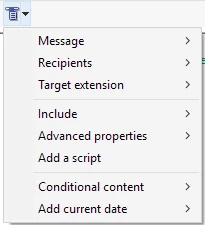
So this understands that these fields exist upstream, its just when I go to preview that it can't seem to pull them through. Is there another way I should be previewing emails when enriching data?

Thanks

This post is no longer active and is closed to new replies. Need help? Start a new post to ask your question.
Jonathon_wodnicki
Jonathon_wodnickiAccepted solution
Community Advisor
January 7, 2019

Hi,

You can preview by using a seed address with custom xml set, under 'Additional data'.

An easy way to get the xml is by capturing the 'Display the target' request using a mitm proxy such as fiddler, then copying a row out of the response. The alternative is to write it by hand, per the instructions at the top of the form.

Thanks,

-Jon

1 reply

Jonathon_wodnicki
Community Advisor
Jonathon_wodnickiCommunity AdvisorAccepted solution
Community Advisor
January 7, 2019

Hi,

You can preview by using a seed address with custom xml set, under 'Additional data'.

An easy way to get the xml is by capturing the 'Display the target' request using a mitm proxy such as fiddler, then copying a row out of the response. The alternative is to write it by hand, per the instructions at the top of the form.

Thanks,

-Jon

Translate