Passing ctx variable value to input text field in webapp | Community
Skip to main content
Level 4
January 25, 2024
Solved

Passing ctx variable value to input text field in webapp

  • January 25, 2024
  • 1 reply
  • 997 views

Hi 
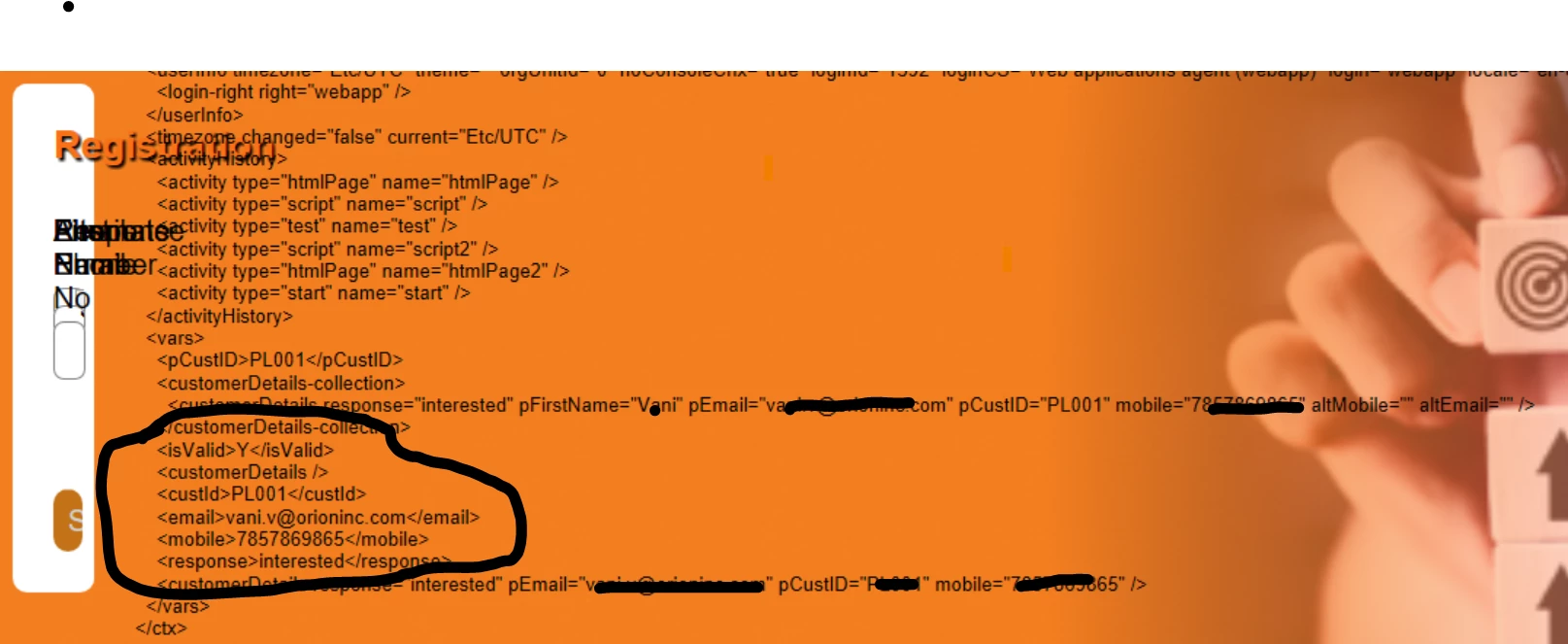
In the below image im getting value in ctx variable like cust id email mobile and response 

so i need to populate the value  in input text field of first name email mobile response 

I was tried this approach but got an error as ctx is not defined

Here im passing the ctx variable value to temp email ,mobile  and response.
var email = (ctx.vars.email).toString();
var mobile = (ctx.vars.mobile).toString();
var response = (ctx.vars.response).toString();

Here im passing email value to id of the text input field 

document.getElementById('email').value =email;
document.getElementById('ph').value = mobile;
document.getElementById('response').value = response;

Does Anyone have idea on this 


This post is no longer active and is closed to new replies. Need help? Start a new post to ask your question.
Best answer by isahore

Hi @vani97,

If you want to carry these values from one page to another, e.g. for data capturing, etc., then you need to use document.controller to transfer the values.

So in the script on the page where these values are being entered by the user, you need to use


document.controller.setValue('/ctx/vars/email', email);

where email is the value entered in the form.


BR,

Ishan

1 reply

isahore
Community Advisor
isahoreCommunity AdvisorAccepted solution
Community Advisor
January 25, 2024

Hi @vani97,

If you want to carry these values from one page to another, e.g. for data capturing, etc., then you need to use document.controller to transfer the values.

So in the script on the page where these values are being entered by the user, you need to use


document.controller.setValue('/ctx/vars/email', email);

where email is the value entered in the form.


BR,

Ishan