Package Import of input cell form failure
Hello Community, I'm running into an error with Package import of Cell input form when trying to insert or update the primary in 'itrv:cell' schema. Please share any suggestion on how to bypass or fix this type error? (Error log below)
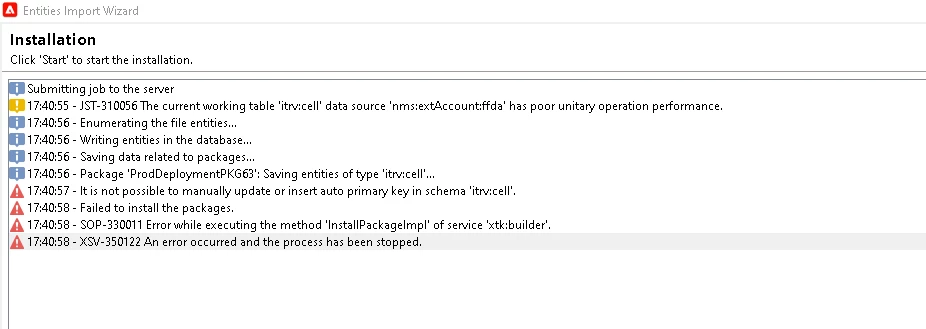
Package content:
<package author="Sofiane Cherrak (scherrak)" buildDate="2023-03-22 21:37:48.789Z"
buildNumber="9480" buildVersion="8.4" img="xtk:installedPackage.png" label="ProdDeploymentPKG63"
name="pPKG82" namespace="itrv" vendor="">
<entities schema="itrv:cell">
<cell SeqID="126" cellLabel="UCC_Market_SP_DepD1_FXWK_23_List1_TM" notificationEmailAddr="juan.martinez@intervalintl.com"
outputType="MBCINDIALT" telemarketingScriptId="U" telemarketingType="II"/>
</entities>
<entities schema="xtk:specFile">
<specFile img="xtk:installedPackage.png" includeDefaultValues="false" includeInstallScript="false"
includeSpec="true" label="ProdDeploymentPKG63" name="pPKG82" namespace="itrv"
type="0">
<definition automaticDefinition="false" id="itrv:cell,UCC_Market_SP_DepD1_FXWK_23_List1_TM"
lineCountMax="5000" schema="itrv:cell">
<where displayFilter="UCC_Market_SP_DepD1_FXWK_23_List1_TM">
<condition expr="@cellLabel='UCC_Market_SP_DepD1_FXWK_23_List1_TM'" internalId="1"/>
</where>
</definition>
<execution buildDate="2023-03-22 21:20:51.151Z" fileName="package_itrv_pPKG82.xml"
filePath="/usr/local/neolane/nl6/var/intervalinternationalinc_mkt_prod1/upload/"
fileSize="13218" objectCount="20"/>
<properties>
<progress current="0" max="0"/>
</properties>
</specFile>
</entities>
</package>
Thanks,
Soph