Open Recipient form as subform | Community
Skip to main content
Level 2
September 6, 2023
Solved

Open Recipient form as subform

  • September 6, 2023
  • 1 reply
  • 551 views

Hello,

I'm trying to open the recipient's form containing all the recipient informations as a subform after clicking on a link on a form, but I'm having hard time figuring out how to do that. Could you please help with this?

Thanks in advance
This post is no longer active and is closed to new replies. Need help? Start a new post to ask your question.
Best answer by ParthaSarathy

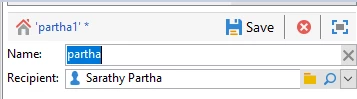
Hi @othboury ,


Try,


<input choiceButton="true" createMode="none" form="nms:recipient" fullLoad="true" img="nms:recipient.png" label="Recipient" newFromModelOnChange="true" noZoom="false" schema="nms:recipient" selectionPath="/tmp/model" type="linkEdit" xpath="/tmp/@model"/>


Or,

In your schema, create a link between your custom schema and recipient schema, and give name as name="recipient" in element tag.

Go to input form, and add the below script,

<input colspan="2" createMode="none" noZoom="false" xpath="recipient"/>


1 reply

ParthaSarathy
Community Advisor
ParthaSarathyCommunity AdvisorAccepted solution
Community Advisor
September 6, 2023

Hi @othboury ,


Try,


<input choiceButton="true" createMode="none" form="nms:recipient" fullLoad="true" img="nms:recipient.png" label="Recipient" newFromModelOnChange="true" noZoom="false" schema="nms:recipient" selectionPath="/tmp/model" type="linkEdit" xpath="/tmp/@model"/>


Or,

In your schema, create a link between your custom schema and recipient schema, and give name as name="recipient" in element tag.

Go to input form, and add the below script,

<input colspan="2" createMode="none" noZoom="false" xpath="recipient"/>


~  ParthaSarathy S~  Click here to join ADOBE CAMPAIGN USER GROUP for Quarterly In-person | Hybrid | Virtual Meetups