One-Click List-Unsubscribe WebApp Upload XML | Community
Skip to main content
April 5, 2024
Solved

One-Click List-Unsubscribe WebApp Upload XML

  • April 5, 2024
  • 1 reply
  • 709 views

The documentation indicates that to activate one-click cancellation, you must upload an XML. I've been looking in the application and I can't find how and where I can upload this XML.

 

https://experienceleague.adobe.com/en/docs/deliverability-learn/deliverability-best-practice-guide/additional-resources/campaign/acc-technical-recommendations#one-click-list-unsubscribe


Nowhere does the import option appear.


Thank you.


This post is no longer active and is closed to new replies. Need help? Start a new post to ask your question.
Best answer by rahulkad29786

Hi @jfg_nadime ,
The xml here means the One-click List Unsubscribe package xml, so you have to upload it as a new package.
So download the xml package from documentation link and then go to below path and upload that.
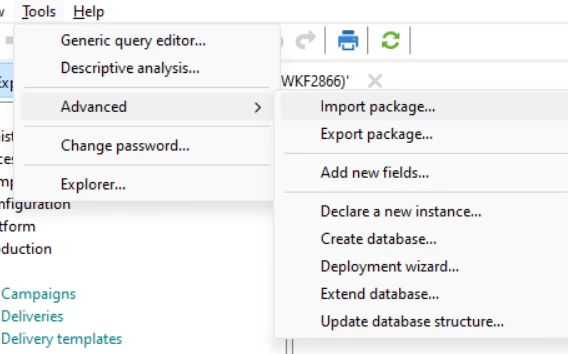
Tools-> Advanced->Import Package


Hope that helps.

Thanks,
Rahul Kad


1 reply

rahulkad29786
rahulkad29786Accepted solution
Level 4
April 5, 2024

Hi @jfg_nadime ,
The xml here means the One-click List Unsubscribe package xml, so you have to upload it as a new package.
So download the xml package from documentation link and then go to below path and upload that.
Tools-> Advanced->Import Package


Hope that helps.

Thanks,
Rahul Kad


April 9, 2024

Thank you so much