thibaultb473199
Level 4
Aug 25, 2020 4:18 AM UTC
Solved

Not being able to add or modify any workflow in a campaign

Hello everyone,

I experience an issue where an user is not being able to add or modify any workflow but few days before was able to do those actions in a daily basis. From the user view, it looks like this, mentioning that the campaign is in "read only" mode and has the activity options disable.
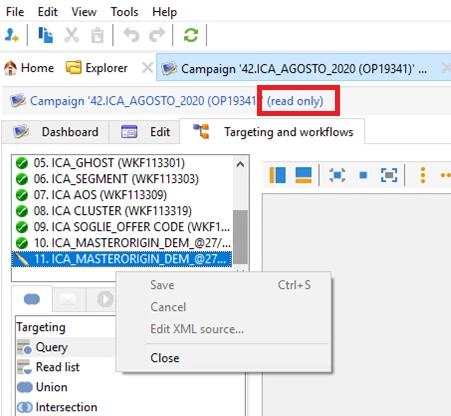
Can't access those options and not being able to modify the workflow.
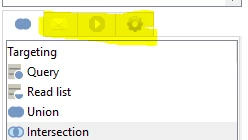
What is causing the issue and how to fix that for this user ? Where is the options to solve the problem ?

Thanks in advance.

This post is no longer active and is closed to new replies. Need help? Start a new post to ask your question.
thibaultb473199
thibaultb473199Accepted solution
Level 4
Sep 17, 2020 8:23 AM UTC

Hello,

I find the answer by looking at the access rights of the operator and those rights were change during this period, the solution is fixed now.

Kind regards

5 replies

New Member
Aug 25, 2020 5:46 AM UTC

Hi,


Please check if the rights of the users have been modified.

You will find this under Administration->Access Management->Operator


Thanks.

Translate
Jonathon_wodnicki
Community Advisor
Community Advisor
Aug 25, 2020 5:47 AM UTC

Hi,


Was the campaign moved to a folder the user doesn't have access to?


Thanks,

-Jon

Translate
thibaultb473199
Level 4
Aug 25, 2020 5:50 AM UTC

Hello, thank you for your answer.

There was no change in term or campaign being in another folder, the user normally can use the folder and have permission to do operation on the campaigns of that specific market

Translate
Sukrity_Wadhwa
Level 4
Sep 2, 2020 1:27 PM UTC

Hi @thibaultb473199,

Were you able to resolve this issue? Do let us know.

Thanks!

Translate
Sukrity Wadhwa
thibaultb473199
thibaultb473199AuthorAccepted solution
Level 4
Sep 17, 2020 8:23 AM UTC

Hello,

I find the answer by looking at the access rights of the operator and those rights were change during this period, the solution is fixed now.

Kind regards

Translate