Need to setup a generic logic to stop the recurring deliveries on sunday and holidays | Community
Skip to main content
September 20, 2019
Solved

Need to setup a generic logic to stop the recurring deliveries on sunday and holidays

  • September 20, 2019
  • 4 replies
  • 5846 views

Hi all,

I need to develop a logic within Adobe campaign classic to stop the recurring delivery on sundays and holidays and delivery should be sent out on next working day in a way that it includes previous day target also. If there is Sunday and holiday in a row then next working day delivery should include all the recipient missed due to holidays.

Is there any way to achieve the same.

Thanks in advance.

Roopal
This post is no longer active and is closed to new replies. Need help? Start a new post to ask your question.
Best answer by Jean-Serge_Biro

4 replies

Jean-Serge_Biro
Level 10
September 23, 2019

Hi Roopal,

2 solutions:

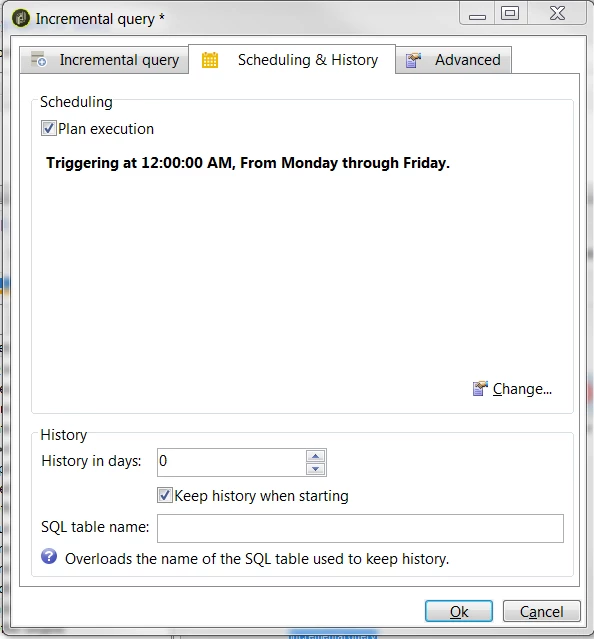
  • use of Incremental Query activity in your workflow: each execution takes the data not already treated. So when something is suspended, it takes the old data (your weekend data) to send it at next execution planified; please see the 2nd tab of the activity, it includes the planification for execution, so you must not set an Planification activity before.
  • do it by your own, with an instance variable or an xtk:option (with getOption at the workflow start and setOption at the end) to set the last record treated. And please put the variable in the Query criteria filters.
    Of course with a planification activity must be put before the Query activity.


Regards
J-Serge

September 23, 2019

Hi Jean,

Thank you for suggestion.

Could you please explain more on planification activity. May be a screenshot will help.

Jean-Serge_Biro
Jean-Serge_BiroAccepted solution
Level 10
September 24, 2019

Raj_Ganta-1
Level 5
October 5, 2019

Hi,

i have used javascript to check if particular day is weekend or US holiday or any company specific holiday and also hard coded few dates based on business rules. Attached is sample code and not the actual code I have used.

var holidays = { // keys are formatted as month,week,day
  
"0,2,1": "Martin Luther King, Jr. Day",
  
"1,2,1": "President's Day",
  
"2,1,0": "Daylight Savings Time Begins",
  
"3,3,3": "Administrative Assistants Day",
  
"4,1,0": "Mother's Day",
  
"4,-1,1": "Memorial Day",
  
"5,2,0": "Father's Day",
  
"6,2,0": "Parents Day",
  
"8,0,1": "Labor Day",
  
"8,1,0": "Grandparents Day",
  
"8,-1,0": "Gold Star Mothers Day",
  
"9,1,1": "Columbus Day",
  
"10,0,0": "Daylight Savings Time Ends",
  
"10,3,4": "Thanksgiving Day"
};
function getDate(year, month, week, day) {
  
var firstDay = 1;
  
if (week < 0) {
  month
++;
  firstDay
--;
  
}
  
var date = new Date(year, month, (week * 7) + firstDay);
  
if (day < date.getDay()) {
  day
+= 7;
  
}
  date
.setDate(date.getDate() - date.getDay() + day);
  
return date;
}
function getHoliday(month, week, day) {
  
return holidays[month + "," + week + "," + day];
}
function getDateString(year, month, week, day) {
  
var date = getDate(year, month, week, day);
  
var holiday = getHoliday(month, week, day);
  
var dateString = date.toLocaleDateString();
  
if (holiday) {
  dateString
+= " \xa0\xa0\xa0" + holiday;
  
}
  
return