Missing options in "Edit query" view | Community
Skip to main content
Level 4
November 24, 2023
Solved

Missing options in "Edit query" view

  • November 24, 2023
  • 2 replies
  • 1018 views

I noticed that when looking at this view in a query it looks like this:
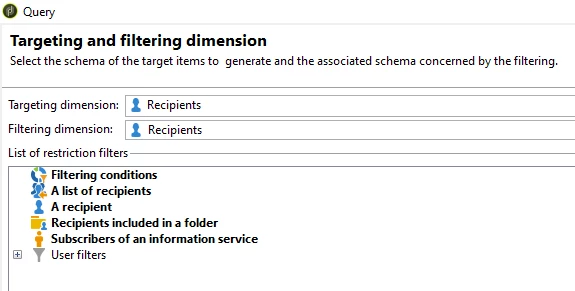

We are missing important standard options like "Recipients of a delivery" and "Recipients of deliveries belonging to a folder" :
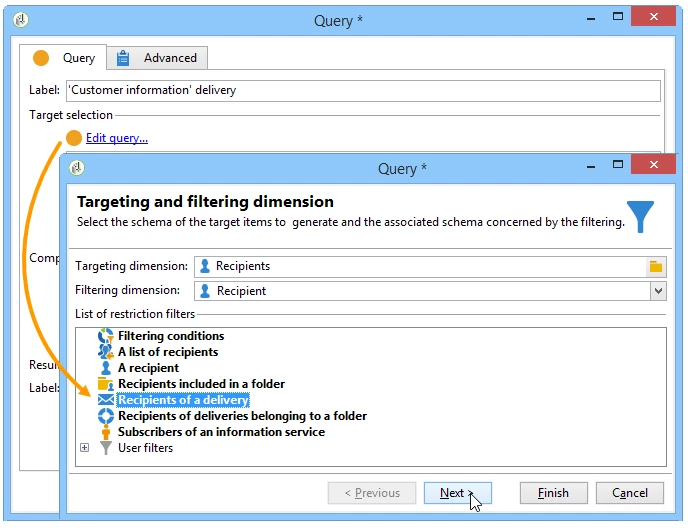
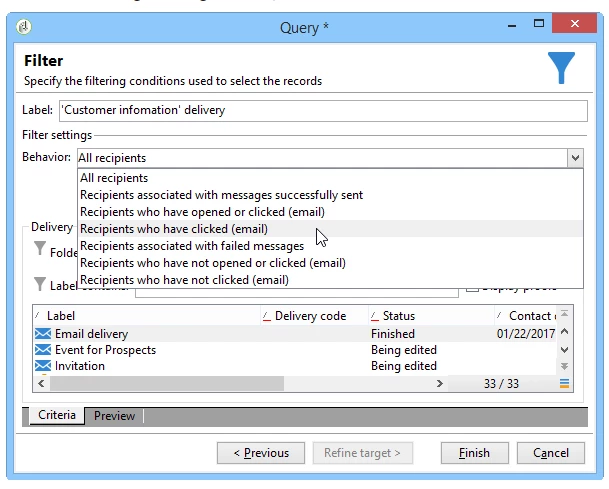
 

How can i restore those? It is crucial for us to have this functionality since it is requested by all users in the system.


This post is no longer active and is closed to new replies. Need help? Start a new post to ask your question.
Best answer by NiteshPandey

@a_b_se🌟 Quick heads up: I noticed you might be experiencing varying outputs from the query, and it could be due to different setup instances. No worries, though!

To get to the bottom of this, how about reaching out to the Campaign team? They're awesome at investigations on the instance level and can give you a hand in figuring things out. Consider opening a support case with them for a more in-depth look.

2 replies

Adobe Employee
November 24, 2023

Hey @a_b_se 

I noticed in a few cases, like 9356, 9359 & 9364, that there are various query options available. The results you're seeing could be influenced by operator rights, potentially limiting them based on specific permissions. So, I'd suggest checking and ensuring you have the necessary permissions for a thorough comparison. This should help get the desired results! 😊


A_B_SEAuthor
Level 4
November 24, 2023

Hello!

We are using 9359 and as admin I cannot see them.

NiteshPandeyAdobe EmployeeAccepted solution
Adobe Employee
November 27, 2023

@a_b_se🌟 Quick heads up: I noticed you might be experiencing varying outputs from the query, and it could be due to different setup instances. No worries, though!

To get to the bottom of this, how about reaching out to the Campaign team? They're awesome at investigations on the instance level and can give you a hand in figuring things out. Consider opening a support case with them for a more in-depth look.

Sukrity_Wadhwa
Community Manager
Community Manager
December 15, 2023

Hi @a_b_se,

Were you able to resolve this query with Campaign Support's help or do you still need help here? Do let us know.

Thanks!

Sukrity Wadhwa