Logs for WebApps - Not showing consistently | Community
Skip to main content
Level 5
March 1, 2023
Solved

Logs for WebApps - Not showing consistently

  • March 1, 2023
  • 1 reply
  • 1197 views

Hello All,


I am on ACC v8 managed.

I have created a WebApp, and try to log information in the WebApp Script Activity, using logInfo or logDebugMessage, 


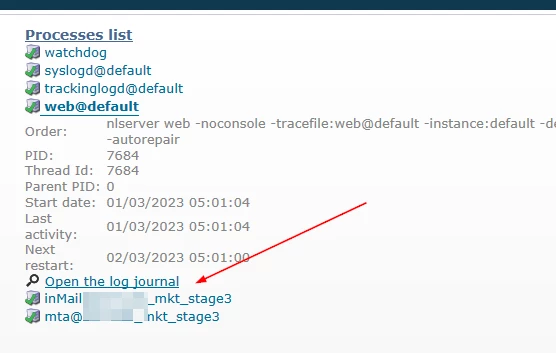
On Navigating to Home -> Monitoring -> Process List -> web@default, and putting the proper date parameters, I still don't see my logs printed there.consistently. Only on few occassions, I am able to see the log messages, but there is no pattern of it being visible there.


This happens both with logDebugMessage, and logInfo.


What would be a better method to log server side values for a WebApp, so that the issues can be debugged consistently ?


Regards,

DG



This post is no longer active and is closed to new replies. Need help? Start a new post to ask your question.
Best answer by david--garcia

No, the logs are physical files in disk. you can access them on your browser however.


Right click on the monitor page link for web log and paste it on your browser, you will need to login just like a webapp, then change the URL structure to point to the 2nd box.


https://myinstance-mkt-stage3-2.campaign.adobe.com/view/displayLogs?vars_proc=web%40default&__universe=supervision&__securitytoken=xxx


1 reply

david--garcia
Level 10
March 1, 2023

I've had the same issue, try logging in to a specific box, your instance by default consists of two servers, and the logs do not seem to sync between them.


I.e. for staging environments

https://myinstance-mkt-stage3.campaign.adobe.com your instance (could be load balance between box 1/2)


To login to a specific box, use the following url structure on your client

https://myinstance-mkt-stage3-1.campaign.adobe.com

https://myinstance-mkt-stage3-2.campaign.adobe.com


For production environments

https://myinstance-mkt-prod1-1.campaign.adobe.com/

https://myinstance-mkt-prod1-2.campaign.adobe.com/


dipendu_gAuthor
Level 5
March 1, 2023

Thanks @david--garcia,


Is there a way I can get the values from both server logs combined.

Maybe if I can create a quick webApp, that would display the combined result ?


Is there any API that queries the log file ?


Regards,

DG