Linking Fields | Community
Skip to main content
davidl14970702
Level 4
March 8, 2018

Linking Fields

  • March 8, 2018
  • 2 replies
  • 8184 views

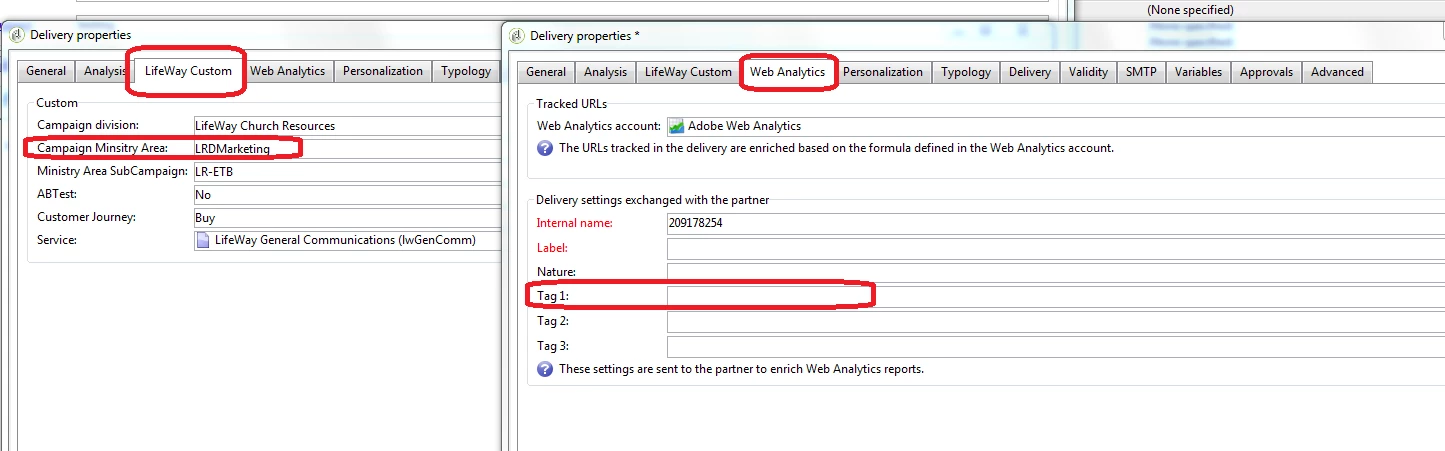
I would like to set one field with an enumeration (on the left, below (@campaign_ministry_area)), and then have the selection be populated in another filed (on the right,webAnalytics/@tag1). I'm not 100% sure where to start.

But both fields are on my extension of the delivery table, in my own namespace.

The purpose of having both fields to is to set one within campaign, while the other gets processed to out web analytics account.

I feel like I can do something like this

<element externalJoin="true" label="Tag1" name="webAnalytics/@tag1" revLink="Delivery"

             target="lw:delivery" type="link">

      <join xpath-dst="@id" xpath-src="@Campaign_Minisitry_Area"/>

Any suggestions would be helpful.
This post is no longer active and is closed to new replies. Need help? Start a new post to ask your question.

2 replies

Amit_Kumar
Level 10
March 9, 2018

Hi David,

You need not change the schema you can go to the input form for the delivery and use below code to pick the value from one tab and use it in another?

<enter>

    <set expr="Iif([@Campaign_Minisitry_Area]=='', 'defaultvalue', [@Campaign_Minisitry_Area])"

         xpath="webAnalytics/@tag1"/>

</enter>

Note: ensure you are using correct Xpaths here

Regards,

Amit

davidl14970702
Level 4
March 10, 2018

I added it but im nor seeing what i would have expected. I added it to the beginning of that container. Is defautvalue supposed to be defaultValue? proper V?

Amit_Kumar
Level 10
March 11, 2018

Hi David,

To Make this work you have to load the xpaths into delivery so that your values can be loaded into the context which was saved before.

attribute name will be like  xpathsToLoad="name of xpaths with comma separated values, which sometimes requires more changes based on the time when you want to see the change etc. in your case you can do it simply by using snippet:

<postSave>

    <if expr="@Campaign_Minisitry_Area != ''">

      <set expr="Coalesce(@Campaign_Minisitry_Area, 'defaultvalue can be anything that you want as default')" xpath="webAnalytics/@tag1"/>

      <set value="nms:delivery" xpath="/ignored/writer/delivery/@xtkschema"/>

      <set value="update" xpath="/ignored/writer/delivery/@_operation"/>

      <set expr="[@id]" xpath="/ignored/writer/delivery/@id"/>

      <soapCall name="Write" service="xtk:persist">

        <param exprIn="[/ignored/writer/delivery]" type="DOMDocument"/>

      </soapCall>

    </if>

  </postSave>

Add this snippet just before the form closing tag in your input form. please ensure all xpaths names as I do not have access to your form.

Remove previously suggested code change.

Regards,

Amit

ManojK_Epsilon
Level 2
July 16, 2020

Hello @davidl14970702 ,


Just use the below code to auto populate the tag1 value with Campaign Ministry Value

<enter>
    <set expr="Iif(@Campaign_Minisitry_Area==''),@Campaign_Ministry_Area ,'DEFAULT_VALUE_HERE')"   xpath="webAnalytics/@tag1"/>
</enter>

Let me know if this works.