
Linking field value to Custom tag section ins web analytics | Community
Skip to main content
pradeep_07
Level 4
July 15, 2020
Question

Linking field value to Custom tag section ins web analytics

  • July 15, 2020
  • 2 replies
  • 2425 views

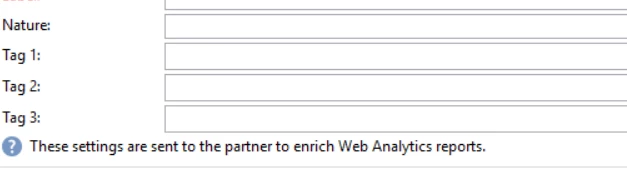
Hey I have scenario where I want to populate the web analytics section custom tag with Campaign name(Folder name).


I know it can be entered manually while creating new deliveries, but I want this field to be populated dynamically when we create new delivery. I have trying to achieve this by adding some code in input forms. so far it did not work. Below is the code am using. Not sure where its going wrong and am sure its missing something.Any thoughts on this approach?


<postSave>

<if expr="@label != ''">

<set expr="Coalesce(@@label, 'defaultvalue can be anything that you want as default')" xpath="webAnalytics/@tag1"/>

<set value="nms:delivery" xpath="/ignored/writer/delivery/@xtkschema"/>

<set value="update" xpath="/ignored/writer/delivery/@_operation"/>

<set expr="[@id]" xpath="/ignored/writer/delivery/@id"/>

<soapCall name="Write" service="xtk:persist">

<param exprIn="[/ignored/writer/delivery]" type="DOMDocument"/>

</soapCall>

</if>

</postSave>
 

Thanks,


Pradeep

This post is no longer active and is closed to new replies. Need help? Start a new post to ask your question.

2 replies

Manoj_Kumar
Community Advisor
Community Advisor
July 15, 2020

Hello @pradeep_07 


If you want to have a the default value as Label add use the code below, instead of Post Save my suggestion would be to use enter. Because if the value is overridden manually then the value won't change because post-save will overwrite the manual entry.


The code to auto-populate the label will be 

<enter> <set expr="iif(@label != '', @label, 'DEFAULT_VALUE_HERE')" xpath="webAnalytics/@tag1"/> </enter>


Let me know if that works.


Thanks,


Manoj  | https://themartech.pro
pradeep_07
Level 4
July 15, 2020

Hi Manoj, I have enter the given code in input forms under nms:delivery and refreshed the deliveries. Still dont see the values in tag1.


Updating Media


Sukrity_Wadhwa
Community Manager
Community Manager
July 31, 2020

Hi @pradeep_07,

Were you able to solve this?

Sukrity Wadhwa
pradeep_07
Level 4
July 31, 2020
Hi, I was able to solve this issue by myself. I will post the solution.
August 17, 2023

Hi Pradeep

can you please share the solution it will be very helpful.