Is there a quick activity (like workflow, delivery etc) serach available in classic as compared to Standard version? | Community
Skip to main content
Level 3
June 15, 2023
Solved

Is there a quick activity (like workflow, delivery etc) serach available in classic as compared to Standard version?

  • June 15, 2023
  • 3 replies
  • 913 views

Hi All,


I'm trying to search workflows in the home screen of classic version without moving through folder structure. But there does not seem to be a search option available unlike standard version.


Hence I was curious to find out - If there a quick activity (like workflow, delivery etc) search available in the home screen UI dashboard of adobe campaign classic as compared to Standard version?


Thank you,

Rutuja Kelkar

This post is no longer active and is closed to new replies. Need help? Start a new post to ask your question.
Best answer by ParthaSarathy

Hi @rut7 ,

By Navigating to Home > Campaigns > you can search for Campaigns, Deliveries, Web applications. 

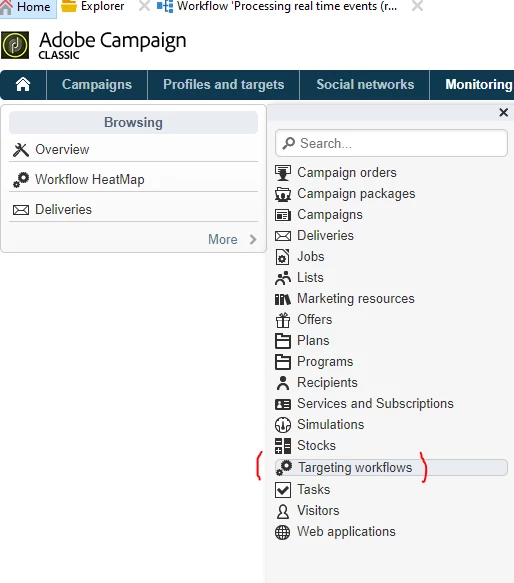
By Navigating to Home > Monitoring > more > you can search for Targeting workflows and other items as per below screenshot


Apart from UI, you can also create View folders in explorer.

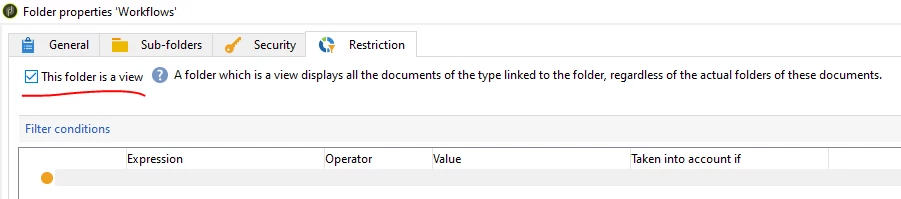
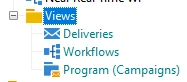
Under any folder, create workflow or delivery or campaign type folder and right click the workflow folder > properties > Restrictions > enable the checkbox 'This folder is a view'. Now you can able to see all the Workflows in your instance in this view folder and you can have a quick search.


3 replies

LakshmiPravallika
Community Advisor
Community Advisor
June 15, 2023

Hi @rut7 ,


Please navigate to Home icon instead of Explorer as below:

After that go to Campaigns (select this at the left side) and then at right side there will be search option to search the Campaigns what you want to find out.


Similarly if you select Monitoring, you will get the search option for "Workflows" and Deliveries"


Regards,

Pravallika.

Level 5
June 15, 2023

Hi @rut7 ,

No you can simply search only campaigns and deliveries and not workflows from home menu in ACC.

ParthaSarathy
Community Advisor
ParthaSarathyCommunity AdvisorAccepted solution
Community Advisor
June 15, 2023

Hi @rut7 ,

By Navigating to Home > Campaigns > you can search for Campaigns, Deliveries, Web applications. 

By Navigating to Home > Monitoring > more > you can search for Targeting workflows and other items as per below screenshot


Apart from UI, you can also create View folders in explorer.

Under any folder, create workflow or delivery or campaign type folder and right click the workflow folder > properties > Restrictions > enable the checkbox 'This folder is a view'. Now you can able to see all the Workflows in your instance in this view folder and you can have a quick search.


~  ParthaSarathy S~  Click here to join ADOBE CAMPAIGN USER GROUP for Quarterly In-person | Hybrid | Virtual Meetups
ZubairHussain
Adobe Employee
Adobe Employee
June 18, 2023

@rut7 

@parthasarathy  has provided the correct answer. The best practice is to utilize Views. Furthermore, Views allow you to search for any string contained within the XML data of that type.

For instance, if you're looking to find which workflows include the variable named "FOO" in any JS/other WKf activity, you can utilize the advanced filter in Wkf views and search with the data containing "FOO".

While this response might be advanced for the original question, it will be beneficial for those who are new to the campaign and plan to work further on the platform.