
Insert a row content in a CSV or EXCEL which is extracted using a DATA extraction activity in a workflow | Community
Skip to main content
satishnagarajan
February 25, 2020
Solved

Insert a row content in a CSV or EXCEL which is extracted using a DATA extraction activity in a workflow

  • February 25, 2020
  • 2 replies
  • 1894 views

Hi,


I'm trying to insert a new row with content as header and description inside a CSV or Excel sheet using the data extraction.


I'm able to insert data as columns, Is it possible to insert a row using a script? 
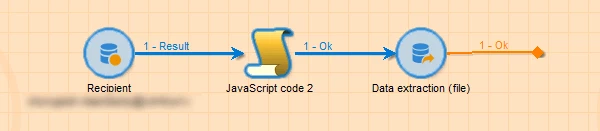


Thank you!!

This post is no longer active and is closed to new replies. Need help? Start a new post to ask your question.
Best answer by Jonathon_wodnicki

Hi,


Yes, this is trivial with scripting, e.g. execCommand("sed -i '1s/^/<added text>/'").

The data extraction activity supports column headers though, so this should be unnecessary.


Thanks,

-Jon

2 replies

Jonathon_wodnicki
Community Advisor
Jonathon_wodnickiCommunity AdvisorAccepted solution
Community Advisor
February 25, 2020

Hi,


Yes, this is trivial with scripting, e.g. execCommand("sed -i '1s/^/<added text>/'").

The data extraction activity supports column headers though, so this should be unnecessary.


Thanks,

-Jon

Level 3
May 2, 2022

Hi @satishnagarajan  I've a requirement to insert data as column(header name) since while data extraction even if we select the option to populate first column as header, for blank file the headers are not populating in current campaign version , could you share how you have achieved this? Through script or any other way?