Increasing delivery logs | Community
Skip to main content
Level 3
January 7, 2020
Solved

Increasing delivery logs

  • January 7, 2020
  • 1 reply
  • 5170 views

Hi,


I need to increase delivery log's aging data deletion to 400 days.


To do that, i remember somewhere in the Adobe campaign classic tool, there will be

an option 'aging data deletion: delivery logs: [180 d]' like that. where can i find this in the tool.

please guide me to find this.


Thanks and regards,

Sarathy.
This post is no longer active and is closed to new replies. Need help? Start a new post to ask your question.
Best answer by Florian_Courgey

Hi,

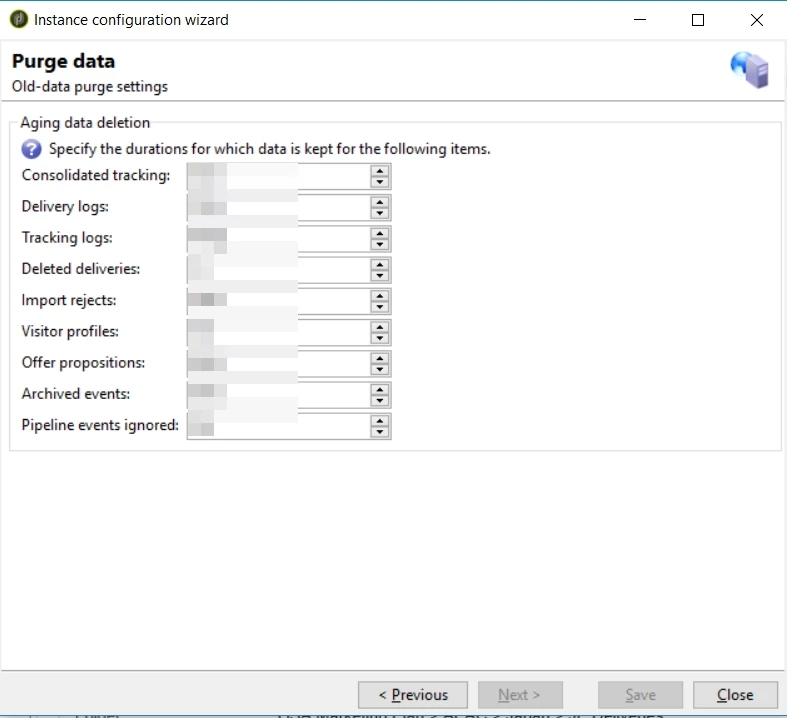
You may go to the Toolbar > Tools > Advanced > Deployment wizard. Hit next until the "Purge data" screen. HEre, you can edit the "Delivery logs" option:

 Alternatively, you can edit the "NmsCleanup_BroadLogPurgeDelay" option

See https://docs.adobe.com/content/help/en/campaign-classic/using/monitoring-campaign-classic/data-processing/database-cleanup-workflow.html for details

1 reply

Florian_CourgeyAccepted solution
Level 4
January 7, 2020

Hi,

You may go to the Toolbar > Tools > Advanced > Deployment wizard. Hit next until the "Purge data" screen. HEre, you can edit the "Delivery logs" option:

 Alternatively, you can edit the "NmsCleanup_BroadLogPurgeDelay" option

See https://docs.adobe.com/content/help/en/campaign-classic/using/monitoring-campaign-classic/data-processing/database-cleanup-workflow.html for details

Level 4
January 17, 2020

Hi,

Is the "cleanup" workflow running? Alternatively, you may start it manually.

This is the workflow responsible of the cleanup task (delete old broad logs, tracking logs...)

Best