This post is no longer active and is closed to new replies. Need help? Start a new post to ask your question.
ParthaSarathy
ParthaSarathyAccepted solution
Community Advisor
Mar 6, 2024 1:37 PM UTC

1) Create a csv file with email address of your seed list.

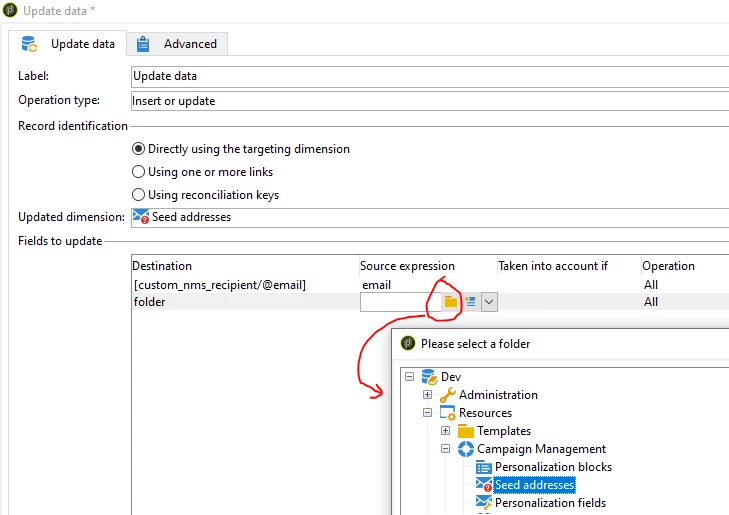
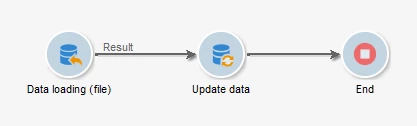
2) Create an import workflow and insert the records into Seed addresses schema (nms:seedMember), and mention the folder as well.

~  ParthaSarathy S

3 replies

ParthaSarathy
Community Advisor
Community Advisor
Mar 4, 2024 11:17 AM UTC

Hi @sanjana12 ,

If you have email address of your seed list in csv file, create an import workflow and insert the records in Seed addresses (nms:seedMember), and mention the folder as well.


And in delivery > To > seed addresses > Edit the dynamic condition > 

Folder equals to <select the folder>

By selecting this folder, all the seed list will get targeted.

If you want to create a separate seed address folder for your campaign, you can import the seed list to the new seed address folder, and call the same in delivery.

Translate
~  ParthaSarathy S
Sanjana12Author
Level 6
Mar 4, 2024 11:27 AM UTC

How to import a seedlist into a folder? Since there is no option to import data

Translate
ParthaSarathy
Community Advisor
ParthaSarathyCommunity AdvisorAccepted solution
Community Advisor
Mar 6, 2024 1:37 PM UTC

1) Create a csv file with email address of your seed list.

2) Create an import workflow and insert the records into Seed addresses schema (nms:seedMember), and mention the folder as well.

Translate
~  ParthaSarathy S