Import data via CSV into custom table | Community
Skip to main content
July 13, 2022
Solved

Import data via CSV into custom table

  • July 13, 2022
  • 1 reply
  • 1196 views

Hi All,


I have a use case where I am importing some data into custom table and in that table I am creating a attribute name as CompanyType as string enum using userEnum="" .I have fixed values to be entered into this column lets say A,B and C


Now I want when user upload a csv file and when map column with this enum column all rows where it's not matching with pre fixed enums value in our database should get rejected. 


So if in csv file I have one row where companyType is D it should get rejected and also if this have small a then also it should get rejected. Only allowed values are A,B and C. 

Can someone please help me out how to resolve this ? As i have created userEnum as closed type still it's not working and user able to enter any values via CSV into this table. 


Thanks

This post is no longer active and is closed to new replies. Need help? Start a new post to ask your question.
Best answer by costa_n11

Hi @ac_dev 

You can achieve the fixed list at the Load Activity level.

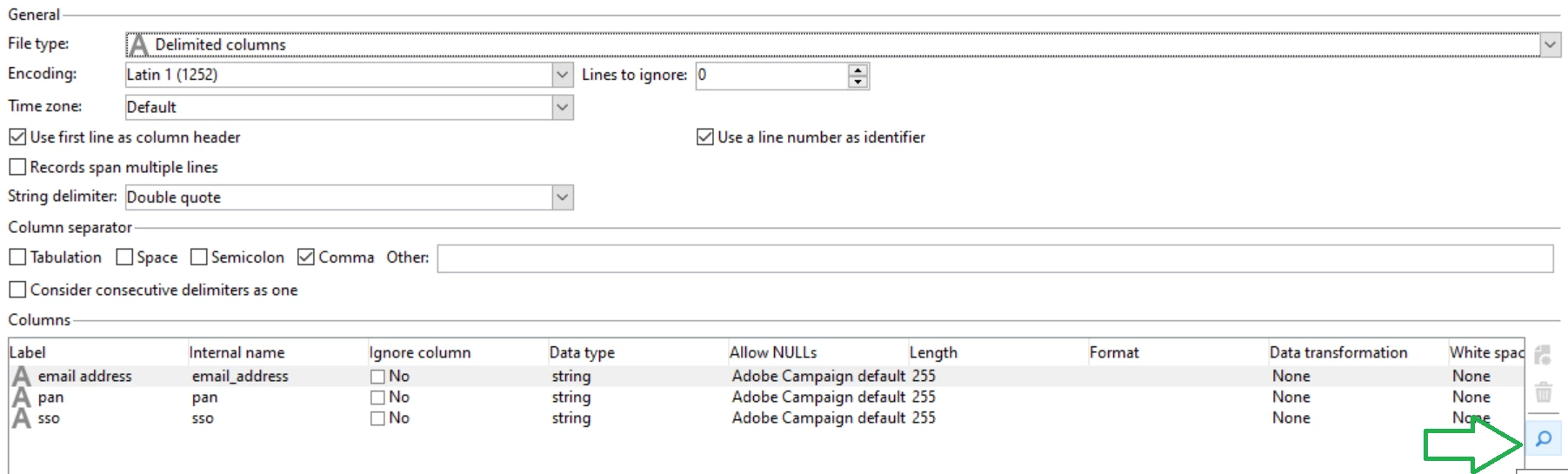
Edit the format 


Select the field you want to format and click on the Detail magnifying icon


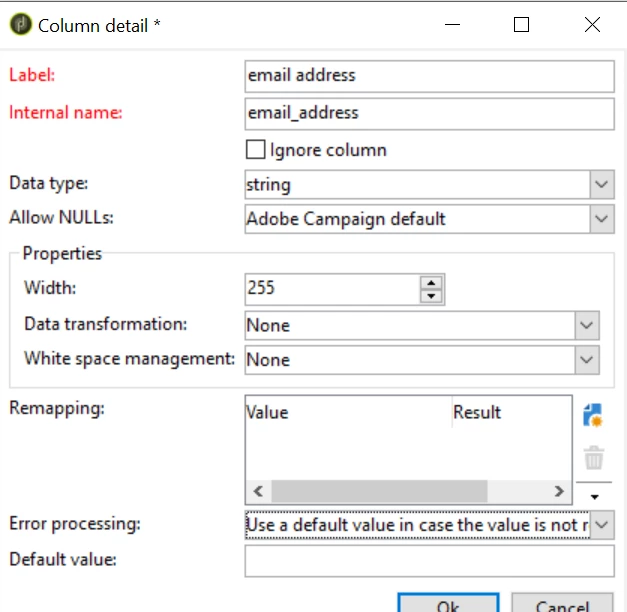
In the Details, use the Remapping section to fill in the expected values from the value in the file to the expected value in the data schema

You would have to set error to use a default value in case of error


Hope this helps,

Thanks

Denis

1 reply

Manoj_Kumar
Community Advisor
Community Advisor
July 13, 2022

Hello @ac_dev 

You can add a split before your update data activity and only accept where the value is A.B and C.


Or 


You can add a condition in the "Taken into account if" section of the update data activity to only update records when A,B or C is coming in the data.

Manoj  | https://themartech.pro
AC_DevAuthor
July 13, 2022

Thanks Manoj for the alternatives but that include extra check at workflow level , since we are creating Enums as closed Type so expectation was even if we try to insert value to this field system should restrict it and give some errors. 

costa_n11Adobe EmployeeAccepted solution
Adobe Employee
July 13, 2022

Hi @ac_dev 

You can achieve the fixed list at the Load Activity level.

Edit the format 


Select the field you want to format and click on the Detail magnifying icon


In the Details, use the Remapping section to fill in the expected values from the value in the file to the expected value in the data schema

You would have to set error to use a default value in case of error


Hope this helps,

Thanks

Denis