I want to extract macros from email templates | Community
Skip to main content
April 19, 2023
Solved

I want to extract macros from email templates

  • April 19, 2023
  • 3 replies
  • 964 views

Hi Community! So I want to extract the macros present in email templates that goes like <%= targetData.policyNo %> <%=targetData.Policy_ID %> but I dont know what is this targetData and where I can fetch these type of macros.How to proceed with targetData and what is it basically..Can we access it as a schema?

This post is no longer active and is closed to new replies. Need help? Start a new post to ask your question.
Best answer by ParthaSarathy

Hi @rs_45 ,

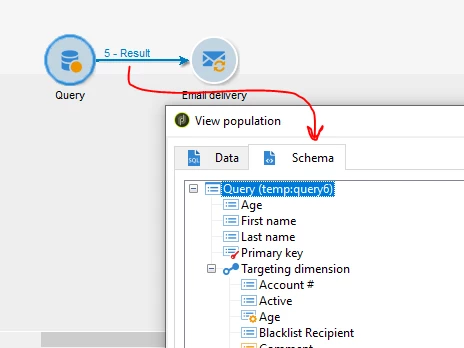
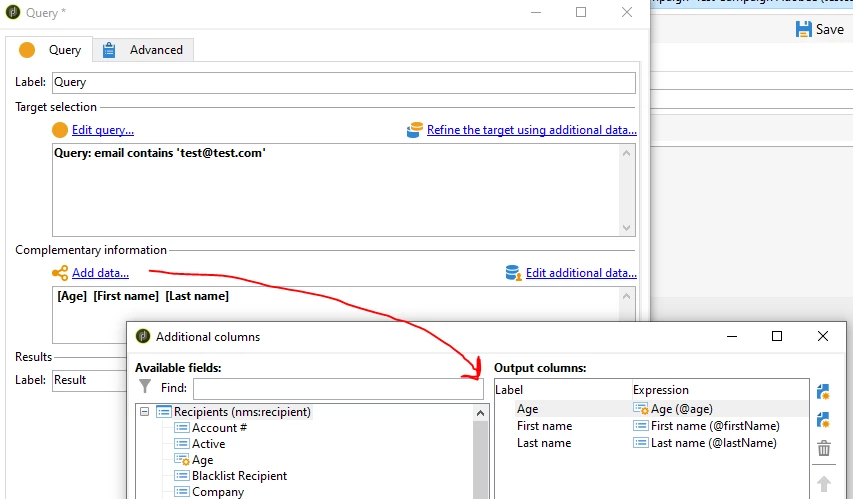
when you 'add data' in query/enrichment as additional data, you can able to see those added attributes in temp schema (display target)


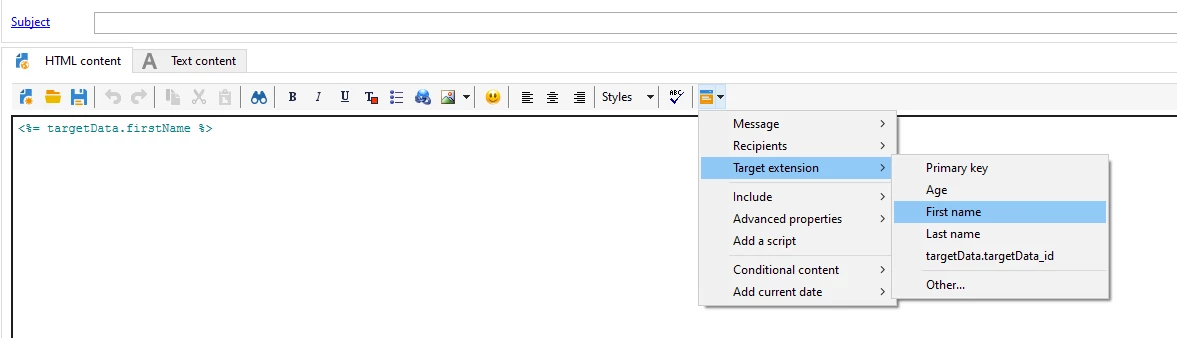
And When you select this attributes while configuring email body, for example when you select firstName, then it will be as <%= targetData.firstName %>

You can see this in nms:delivery schema.

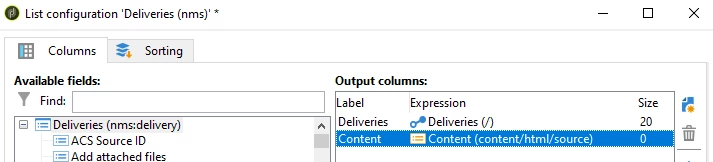
Goto nms:delivery schema > Data tab > Right click & configure list > Add > [content/html/source]


3 replies

ParthaSarathy
Community Advisor
ParthaSarathyCommunity AdvisorAccepted solution
Community Advisor
April 19, 2023

Hi @rs_45 ,

when you 'add data' in query/enrichment as additional data, you can able to see those added attributes in temp schema (display target)


And When you select this attributes while configuring email body, for example when you select firstName, then it will be as <%= targetData.firstName %>

You can see this in nms:delivery schema.

Goto nms:delivery schema > Data tab > Right click & configure list > Add > [content/html/source]


~  ParthaSarathy S~  Click here to join ADOBE CAMPAIGN USER GROUP for Quarterly In-person | Hybrid | Virtual Meetups
akshaaga
Adobe Employee
Adobe Employee
April 21, 2023

@rs_45 ,


TargetData is a reserved keyword that refers to the data associated with the recipient of an email. It contains all the data related to the recipient profile, such as their name, email address, and any additional data attributes that you may have associated with them.

The macros that you have mentioned, i.e., '<%= targetData.policyNo %>' and '<%= targetData.Policy_ID %>' are examples of personalization macros. They are used to dynamically insert the recipient's data into the email template at the time of delivery.

To access the targetData macros, you need to have a valid recipient profile associated with the email delivery. Typically, you would define a target audience for your email campaign, and Adobe Campaign would automatically populate the targetData macros with the recipient's data at the time of delivery.

You can also access targetData attributes using workflows, by using the "Update Data" activity to fetch the recipient data from the database and populate it into a temporary schema. You can then use the schema to access and manipulate the recipient data attributes.

In summary, targetData is not a schema that you can access directly, but rather a reserved keyword that refers to the recipient data associated with an email delivery. To extract targetData macros from email templates, you would need to have access to the recipient data at the time of delivery.


Sukrity_Wadhwa
Community Manager
Community Manager
May 4, 2023

Hi @rs_45,

Were you able to resolve this query with the help of the given solutions or do you still need more help here? Do let us know. In case the given solutions were helpful, then kindly choose the one that helped you the most as the 'Correct Reply'.
Thanks!

Sukrity Wadhwa