How to use output of first query as input of second query and filter results? | Community
Skip to main content
Level 4
August 17, 2023
Solved

How to use output of first query as input of second query and filter results?

  • August 17, 2023
  • 4 replies
  • 1883 views

I have 2 different queries in a single workflow. First query is having targeting dimension as recipient and filtering dimension as segment profile. Second query is having subscribers application as targeting and filtering dimension.


I want to use output of first query as input of second query. Is this possible?


Also, how I can get attributes related to filtering dimension of first query in second query?


Basically, first query is giving the list of recipients who belongs to a segment. Now, I want to check whether these recipients are matching criteria mentioned in second query


I have attached this workflow for reference.


Thanks
This post is no longer active and is closed to new replies. Need help? Start a new post to ask your question.
Best answer by ParthaSarathy

Hi @vinay16 ,

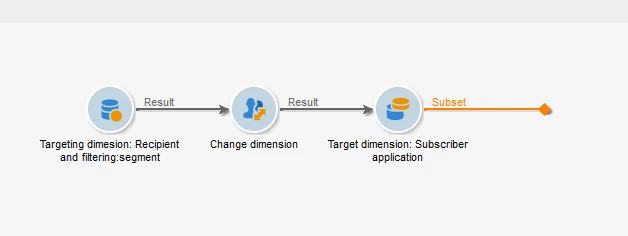
The solution for your logic will be as below, Only modification is that its good to use 'split' activity instead of Query-2, which will give the same output.

Query1:

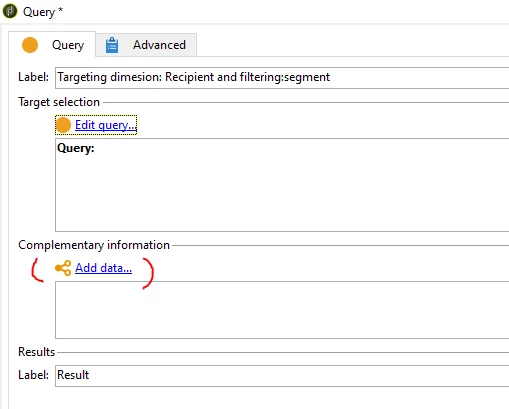
As you had mentioned, you can select targeting dimension as recipient and filtering dimension as segment profile, and configure filtering conditions.

To add attributes related to filtering dimension of first query, click on Add data and follow the steps to add attributes. You can refer this documentation for more details


Change dimension:

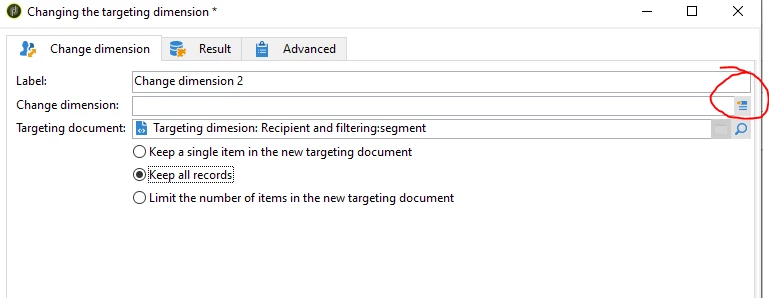
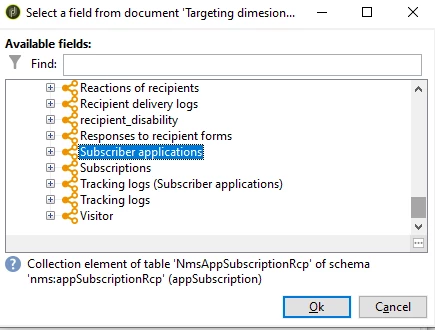
Select change dimension, expand targeting dimension and scroll down, you can find 'subscriber applications' and select it.

And select 'Keep all records'


Split activity:

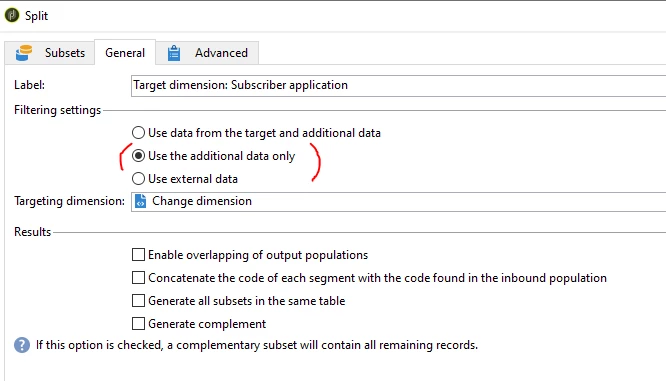
Go to general tab > select 'use additional data only' radio button

Now go to subset tab > select 'add a filtering condition on the inbound population' > edit > Now you can able to see targeting and filtering dimension is ;subscriber application' and the targeting population are the result of Query-1.


Hope this helps!


4 replies

AkshayAnand
Community Advisor
Community Advisor
August 18, 2023

Hi @vinay16 


You can use output of first query as input of second query by selecting temporary schema as the filtering condition.


To make the attributes available in the workflow you need to call them using "ADD Data" option and pull the necessary attributes.

 Please find the screenshot of a sample workflow.


Regards

A


vinay16Author
Level 4
October 31, 2023

Thank you for your help

LakshmiPravallika
Community Advisor
Community Advisor
August 18, 2023

Hi @vinay16 ,


Please try using Change dimension activity after your first query to subscribers application Schema and then give that as an input to your second query and Please select the Option "Keep all records" in your Change dimension activity for the Data in query1 to be available in the workflow.


Regards,

Pravallika.

vinay16Author
Level 4
October 31, 2023

Thank you for reply. This helps

ParthaSarathy
Community Advisor
ParthaSarathyCommunity AdvisorAccepted solution
Community Advisor
August 18, 2023

Hi @vinay16 ,

The solution for your logic will be as below, Only modification is that its good to use 'split' activity instead of Query-2, which will give the same output.

Query1:

As you had mentioned, you can select targeting dimension as recipient and filtering dimension as segment profile, and configure filtering conditions.

To add attributes related to filtering dimension of first query, click on Add data and follow the steps to add attributes. You can refer this documentation for more details


Change dimension:

Select change dimension, expand targeting dimension and scroll down, you can find 'subscriber applications' and select it.

And select 'Keep all records'


Split activity:

Go to general tab > select 'use additional data only' radio button

Now go to subset tab > select 'add a filtering condition on the inbound population' > edit > Now you can able to see targeting and filtering dimension is ;subscriber application' and the targeting population are the result of Query-1.


Hope this helps!


~  ParthaSarathy S~  Click here to join ADOBE CAMPAIGN USER GROUP for Quarterly In-person | Hybrid | Virtual Meetups
vinay16Author
Level 4
October 31, 2023

This worked. Thanks a lot for your help.

Sukrity_Wadhwa
Community Manager
Community Manager
September 7, 2023

Hi @vinay16,

Were you able to resolve this query with the help of the given solutions or do you still need more help here? Do let us know. In case the given solutions were helpful, then kindly choose the one that helped you the most as the 'Correct Reply'.
Thanks!

Sukrity Wadhwa
vinay16Author
Level 4
October 31, 2023

I have selected correct reply. Thanks