How to use dynamic attachment name | Community
Skip to main content
Level 2
October 23, 2020
Solved

How to use dynamic attachment name

  • October 23, 2020
  • 2 replies
  • 2604 views

we are sending transactional email with attachment via message center.

Currently we dont have connection to sftp the file to the adobe server before the sent, we try to upload the file to the google cloud storage and generate the signed url, then pass to the rtevent. However this is not working. (error message: Unreachable Inbound email bounce (rule 'Probably_unreachable' has matched this bounce))


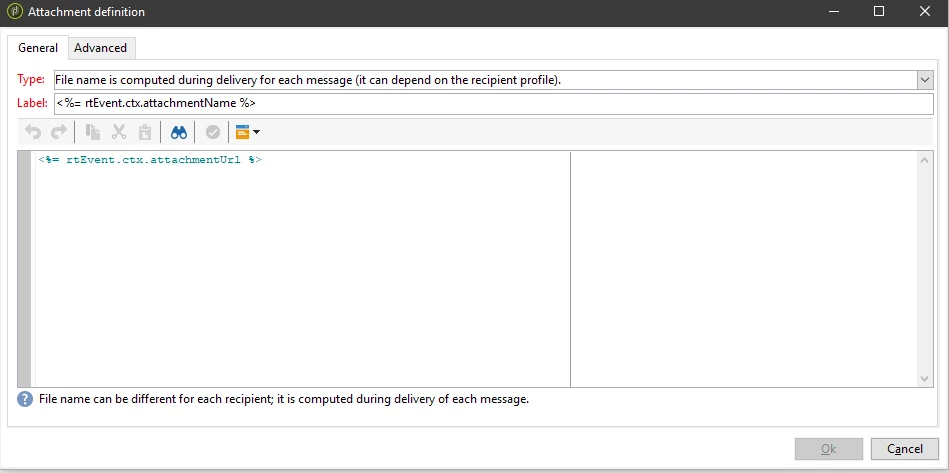
We have tried using a public link such as https://host/file.pdf, and it works perfectly fine. however if we tried pass the url as https://host/file.pdf?test=test, the attachment name received in the email is "file.pdftest=test".  below is our current attachment configuration.


The signed url will have long query parameters with the authentication headers, which i think why it cause the email to bounce.

so the question is, is there a way to customize the attachment name?


Sample url is something like this:
https://storage.googleapis.com/bucketname/sample.pdf?x-goog-signature=signature&x-goog-algorithm=GOOG4-RSA-SHA256&x-goog-credential=credential%40serviceaccount.google.copm%2F20201023%2Fnorthamerica-northeast1%2Fstorage%2Fgoog4_request&x-goog-date=20201023T165959Z&x-goog-expires=6000&x-goog-signedheaders=host

This post is no longer active and is closed to new replies. Need help? Start a new post to ask your question.
Best answer by isahore

Hi @chiding,


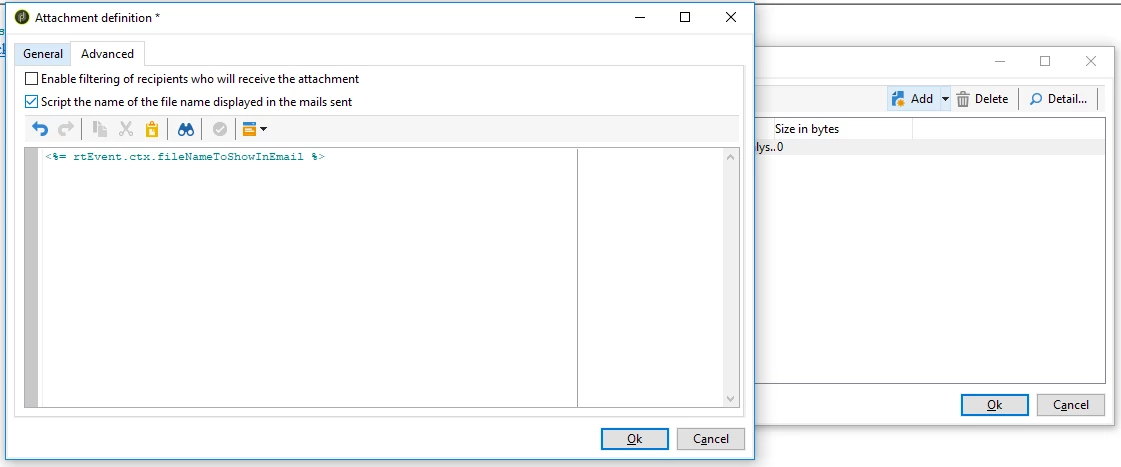
You can also have a dynamic name to your attachment based on a value of a field from the request. e.g. <%= rtEvent.ctx.fileNameToShowInEmail %>

You need to go to the advanced tab of the "Attachment definition" window, and do the following. This way you can have a different name for every request.

Regards,

Ishan


2 replies

chiDingAuthor
Level 2
October 24, 2020

found a solution myself:


added a Content-Disposition header with filename solve the problem.

Content-Disposition: attachment; filename="filename.pdf"

isahore
Community Advisor
isahoreCommunity AdvisorAccepted solution
Community Advisor
October 28, 2020

Hi @chiding,


You can also have a dynamic name to your attachment based on a value of a field from the request. e.g. <%= rtEvent.ctx.fileNameToShowInEmail %>

You need to go to the advanced tab of the "Attachment definition" window, and do the following. This way you can have a different name for every request.

Regards,

Ishan


chiDingAuthor
Level 2
October 28, 2020
thanks, this is the correct answer.