Level 4
Dec 6, 2021 5:05 AM UTC
Solved

how to Test Data schema in query editor in adobe Campaign Classic.please help me on this part


Test schema in query editor\

please tell me steps unable to find this in documentation


This post is no longer active and is closed to new replies. Need help? Start a new post to ask your question.
david--garcia
david--garciaAccepted solution
Level 10
Dec 6, 2021 7:08 AM UTC

Can you be more specific? provide more context.


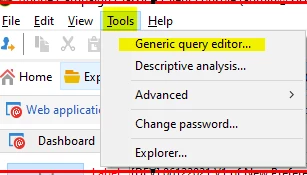
Do you mean; once you created your schema and deployed it, you want to test it by using the generic query editor? alternativaly, you may use the same steps below to configure your query activity in the workflow to fetch data from your schema.


  1. Go to Tools >> Generic query Editor
  2.  

  3. Type the name of your schema and click next.
  4. Select the columns you want to display (data extract) then next
  5. Apply sorting based on a column (optional), Next
  6. Configure your condition by chosing the criteria.

Here are some docs for support


https://www.linkedin.com/in/david-garcia-uk/ | https://martech.network

1 reply

david--garcia
david--garciaAccepted solution
Level 10
Dec 6, 2021 7:08 AM UTC

Can you be more specific? provide more context.


Do you mean; once you created your schema and deployed it, you want to test it by using the generic query editor? alternativaly, you may use the same steps below to configure your query activity in the workflow to fetch data from your schema.


  1. Go to Tools >> Generic query Editor
  2.  

  3. Type the name of your schema and click next.
  4. Select the columns you want to display (data extract) then next
  5. Apply sorting based on a column (optional), Next
  6. Configure your condition by chosing the criteria.

Here are some docs for support


Translate
https://www.linkedin.com/in/david-garcia-uk/ | https://martech.network