
How to store webApp survey responses into archived fields. | Community
Skip to main content
RajeshBhat
Level 3
April 22, 2024
Solved

How to store webApp survey responses into archived fields.

  • April 22, 2024
  • 1 reply
  • 1065 views

I have created a survey webApp with few questions which involves responses through radio button and checkbox input fields. I have created archived fields to store the responses. Now I'm facing couple of issues.

  1.  The responses are not getting stored into archived fields.

I have below query to write response into an archived field "q1"

document.controller.setValue('/ctx/webAppLogRcpData/' + elementDataLabel, objectValue, elementDataLabel);

I'm seeing right values in all variables - elementDataLabel, objectValue


2. I was seeing a validate button at the bottom of the page getting added and the responses (recipient Id and timestamp) were getting logged in webAppLogRcpData only after clicking this button. Hence I disabled the next page in Page (v5 compatibility) activity and then called the function (document.controller.submit("submit")) which was present in validate button click on my final button click. Now after the submit instead of moving to the thank you page I see a different page which displays the message "Enter the content of the page here". It seems this is a default page which gets created when I use Page (v5 compatibility). 


Appreciate any inputs to resolve these. 
This post is no longer active and is closed to new replies. Need help? Start a new post to ask your question.
Best answer by RajeshBhat

@rajeshbhat 


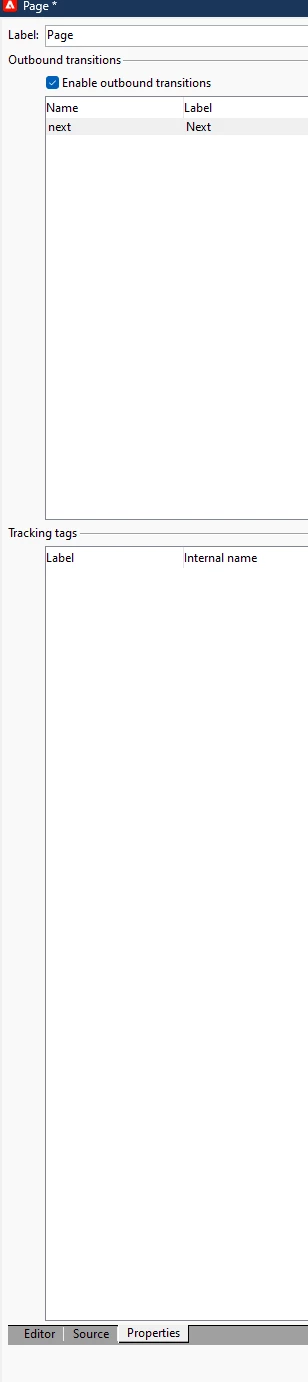
Open the page activity and go the properties tab.


Disable the checkbox which says Enable the outbound transitions


Hi @_manoj_kumar_ ,

I had tried this option but when I do this, it stops saving responses into webAppLogRcpData schema as I connected page activity to Storage activity. However I have found a solution. I just replicated my TY page in end activity and it seems to be working fine. 

Thank you for your inputs!


1 reply

Manoj_Kumar
Community Advisor
Community Advisor
April 23, 2024

Hello @rajeshbhat 


This default content is available in the END activity used in the web page.

Manoj  | https://themartech.pro
RajeshBhat
Level 3
April 23, 2024

Hi @_manoj_kumar_ ,

Thanks for your reply! I found that in End activity. How can I stop moving to that page because I need to stay in the existing page itself where I'm hiding/unhiding based on the user input and displaying different messages as part of Thank You page. However I still need to save the responses to webAppLogRcpData on button click. 


Do you have any feedback on storing responses to archived field? I still don't see responses getting saved to this field when I pull this in Responses tab of webApp. 


TIA!

Manoj_Kumar
Community Advisor
Community Advisor
April 23, 2024

@rajeshbhat 


Open the page activity and go the properties tab.


Disable the checkbox which says Enable the outbound transitions


Manoj  | https://themartech.pro