flora_xue
Level 2
Nov 6, 2019 7:18 AM UTC
Solved

How to solve the failure of deleting one record of Recipients in Adobe Campaign?

Hello Everyone,

I would like to delete one record of recipient, but failed.  Here is how the error looks like :
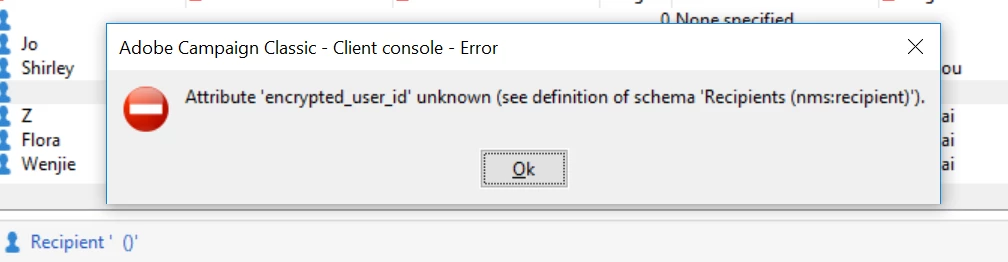
Do you already encounter this problem and if yes, how I can resolve that ?

If you need more information, feel free to ask.

Thanks in advance.

Kind regards.

Flora

This post is no longer active and is closed to new replies. Need help? Start a new post to ask your question.
Venu_Reddy
Venu_ReddyAccepted solution
Level 6
Nov 7, 2019 9:19 AM UTC

It is strongly recommended not to use the Delete option in this case.

To delete recipients, move them to a specific folder and then purge the content of this folder.

To purge a folder, use the Actions > Purge folder menu, accessed by right-clicking the desired folder.

Please find the below link for more details

Managing profiles

4 replies

Venu_Reddy
Level 6
Nov 7, 2019 8:55 AM UTC

Hi Flora,

How the recipient data is importing into campaign database? (on daily basis through external connector / SMTP files/ .csv files ?)

You can't delete the recipients directly and the recipient will come again into database if the data is importing via import workflows on daily basis.

Translate
flora_xue
flora_xueAuthor
Level 2
Nov 7, 2019 9:05 AM UTC

Now we just testing if we could send email delivery in adobe campaign. Till now, we haven't import recipients list to adobe campaign. At beginning ,there is no recipient in adobe campaign. In order to test, we input several new recipients in manual. Then we tried to delete one, but failed. Is any way to delete these recipients which is input in manual?

Thanks

Flora

Translate
Venu_Reddy
Venu_ReddyAccepted solution
Level 6
Nov 7, 2019 9:19 AM UTC

It is strongly recommended not to use the Delete option in this case.

To delete recipients, move them to a specific folder and then purge the content of this folder.

To purge a folder, use the Actions > Purge folder menu, accessed by right-clicking the desired folder.

Please find the below link for more details

Managing profiles

Translate
flora_xue
flora_xueAuthor
Level 2
Nov 8, 2019 7:11 AM UTC

Hi Venur

Thanks you so much for your great advice. I operate follow your instruction. It works!

Translate