How to remove double quotes from extract .CSV file | Adobe Higher Education
Skip to main content
March 12, 2023
Répondu

How to remove double quotes from extract .CSV file

Hello campaign experts, I'm trying to load a .CSV file produced by Adobe campaign extract process then load it into an Oracle table via SQL Loader utility but running into challenges populating the table with "" strings in fields. the extract file produce fields with a set of a double quotes around it.


Current output .CSV data:

"njpottery@yahoo.com","03/09/2023 09:00:45","712405,03/09/2023 09:00:45","Y"


Desired output .CSV data:

njpottery@yahoo.com,03/09/2023 09:00:45,712405,03/09/2023 09:00:45,Y


Any suggestion on how to achieve the desired output result is greatly appreciated.


Thanks,

Sof



Ce sujet a été fermé aux réponses.
Meilleure réponse par ParthaSarathy

Hi @soph1997 ,

You can try this approach,

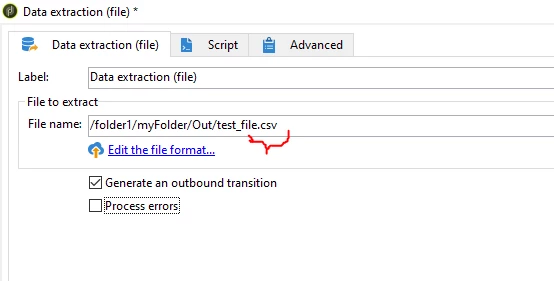
Define the file name as .csv in data extraction activity

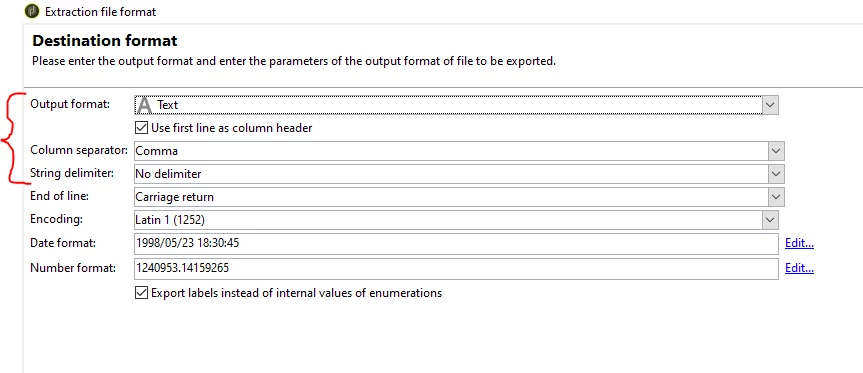
Click on 'Edit the file format' and navigate to 'Destination Format' and configure as below

So the output file will be a .csv file, and string values will have no delimiter


1 commentaire

ParthaSarathy
Community Advisor
Community Advisor
March 13, 2023

Hi @soph1997 ,

You can try this approach,

Define the file name as .csv in data extraction activity

Click on 'Edit the file format' and navigate to 'Destination Format' and configure as below

So the output file will be a .csv file, and string values will have no delimiter


~  ParthaSarathy S~  Click here to join ADOBE CAMPAIGN USER GROUP for Quarterly In-person | Hybrid | Virtual Meetups
Soph1997Auteur
March 14, 2023

Hi Partha, Thanks for suggested approach. It's working as intended and was able to load the data into a external oracle table with the format produced.


Thanks,

Soph