How to move a file on SFTP from one folder to another via technical workflow? | Community
Skip to main content
Level 2
July 25, 2023
Solved

How to move a file on SFTP from one folder to another via technical workflow?

  • July 25, 2023
  • 2 replies
  • 1866 views

HI All,


i am trying to move the file in SFTP from one folder to another folder i have used execCommand('mv sftp....com/input/Filename sftp....com/Archive'); but still i am getting error  (err=2, the system cannot find the file specified.).here i have used this code in File Transfer, File collector and JS
 

Thank You


This post is no longer active and is closed to new replies. Need help? Start a new post to ask your question.
Best answer by LakshmiPravallika

Hi @rudrapraveenkumar ,


Please try using File Transfer activity and select the action as "File download" and select the External account of the Marketing server and give the Path of the File and File name to be downloaded.


In you scenario, mostly the Directory Path is incorrect...Please give the right Path.


Also, you can remove the file with the below Option after processing


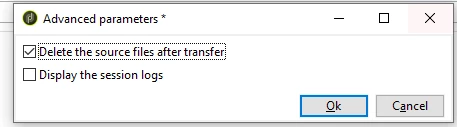
Advanced Parameters--> Delete the source files after transfer


Even the mv command will work, if right paths are given.


Regards,

Pravallika.

2 replies

Level 3
July 26, 2023

Hi Rudra,

Can you please help me with below points?

1. Is this SFTP configured as an External Account and you are trying to move file from one location to another in SFTP folder?

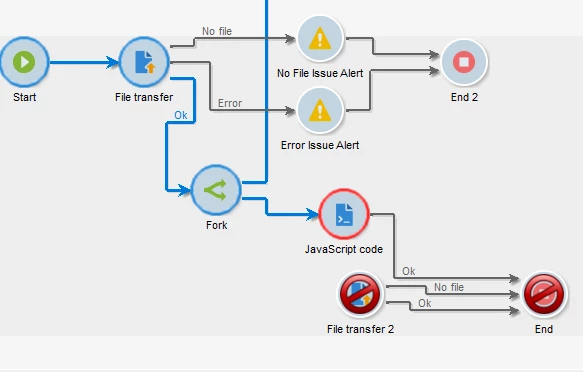
--If it is external account, you can simply use File Transfer Activity--> Download File--> And select Upload file in another File Transfer Activity and run the workflow

Note: The folder needs to be available for this to work (As per my understanding).


2. If it is not an external account and you are trying to move file from one folder to another in Marketing server. Can you show the logic?


Thanks,

Krishna


Level 2
July 26, 2023

Hi @krishnakanth_patnaik_cc ,

1. Is this SFTP configured as an External Account and you are trying to move file from one location to another in SFTP folder? ...... Yes, it an external account 

--If it is external account, you can simply use File Transfer Activity--> Download File--> And select Upload file in another File Transfer Activity and run the workflow.... i tried but in this case file copying from one folder to another, not moving, i dont want to be there in both folders


LakshmiPravallika
Community Advisor
LakshmiPravallikaCommunity AdvisorAccepted solution
Community Advisor
July 28, 2023

Hi @rudrapraveenkumar ,


Please try using File Transfer activity and select the action as "File download" and select the External account of the Marketing server and give the Path of the File and File name to be downloaded.


In you scenario, mostly the Directory Path is incorrect...Please give the right Path.


Also, you can remove the file with the below Option after processing


Advanced Parameters--> Delete the source files after transfer


Even the mv command will work, if right paths are given.


Regards,

Pravallika.