How to modify the "To send" count in a delivery? | Community
Skip to main content
New Member
June 23, 2025
Solved

How to modify the "To send" count in a delivery?

  • June 23, 2025
  • 2 replies
  • 486 views

Hi everyone,

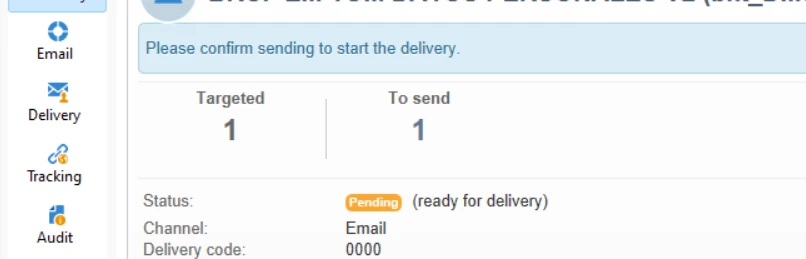
I'm running some tests with a delivery in Adobe Campaign and I’d like to know if it's possible to manually modify the number of recipients shown in the "To send" field (for example, for testing or simulation purposes). Is there any way to adjust this value either before sending or during the preparation phase?

I’d really appreciate any guidance or insights you can share.

Thanks in advance


@parthasarathy @_manoj_kumar_ @parvesh_parmar



This post is no longer active and is closed to new replies. Need help? Start a new post to ask your question.
Best answer by ParthaSarathy

Hi @yannsu ,

Target the same volume of recipients which you want to display in the 'To Send' dashboard. But if you're running the test delivery, make sure you enable 'Confirm the delivery' option, and not to click on 'confirm' button in order not to send test email to actual audience.

2 replies

ParthaSarathy
Community Advisor
ParthaSarathyCommunity AdvisorAccepted solution
Community Advisor
June 23, 2025

Hi @yannsu ,

Target the same volume of recipients which you want to display in the 'To Send' dashboard. But if you're running the test delivery, make sure you enable 'Confirm the delivery' option, and not to click on 'confirm' button in order not to send test email to actual audience.

~  ParthaSarathy S~  Click here to join ADOBE CAMPAIGN USER GROUP for Quarterly In-person | Hybrid | Virtual Meetups
Thanongdach
Level 3
June 25, 2025

Hi @yannsu 

In Adobe Campaign (Classic v7 and v8), it's not possible to manually modify the recipient count shown in the “To send” field. That value is generated based on your target audience defined in the workflow or targeting tab and reflects the result of the current filtering and preparation logic.

For testing or simulation purposes, the recommended approach is to:

-  Use seed addresses or test profiles specifically configured for internal validation

-  Apply filtering criteria in your target query to limit the audience to a small sample (e.g., 1–2 test records)

-  Or, in v7, use the Proof function to preview the delivery content and personalization

Modifying the “To send” count directly is not supported, and using real recipients for test sends is generally discouraged for privacy and deliverability reasons.

Hope this helps clarify!

Best regards,
Thanongdach