How to export detailed email engagement report by user in Adobe Campaign? | Community
Skip to main content
Sreeji_Lal
Level 2
June 9, 2025
Solved

How to export detailed email engagement report by user in Adobe Campaign?

  • June 9, 2025
  • 2 replies
  • 534 views

Hi all.

I'm trying to create a comprehensive email performance report from Adobe campaign. Currently I organize my campaigns by month (each month in a separate folder), and am preparing a report with the following structure:


Sheet1:

Campaign summary:

  • Campaign Name

  • Send Date

  • Target Audience (Segment Name)

  • Total Target Count

  • Opens

  • Clicks

  • Unsubscribes

  • Failures

Sheet 2: 

User level engagement:

  • Few basic details like id, email id, mob number, name etc.

  • Number of Emails received

  • List of Emails received (Campaign names)

  • Open activity count

  • List of emails opened

  • Click activity count

  • List of emails clicked

  • Unsubscribed - Yes/No

  • Email from which user unsubscribed

Is there a way to extract any of this data directly from Adobe Campaign - either by query activity, logs, or a pre-built report? Any suggestions on the best way to approach this or export it efficiently would be really helpful.


Thanks in advance.



This post is no longer active and is closed to new replies. Need help? Start a new post to ask your question.
Best answer by ParthaSarathy

Hi @sreeji_lal ,

You can able to export this as a 2 different csv file.

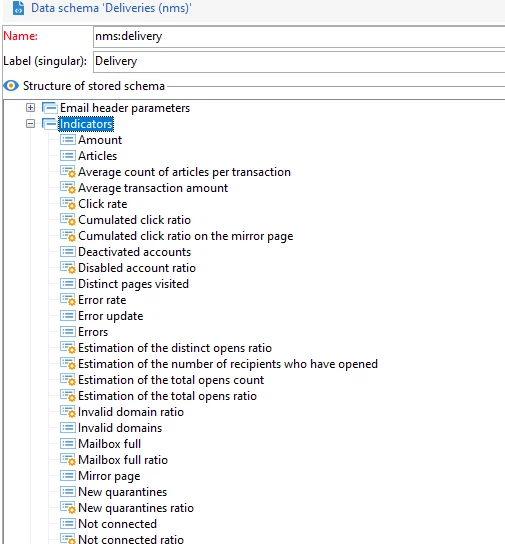
1) Campaign summary details which you mentioned, you can get it from nms:delivery schema. And most of your ask can be fetched from delivery > indicators.

2) User level engagement details mentioned by you can be find in nms:trackingLogRcp schema.

Idea is, Use Query activity > select the schema mentioned above > add all the fields which you require in edit additional data > If you want to export a file in SFTP or server, use data extraction activity and file transfer activity > or to download it to local, Right click the query's output > display the target > export as a file to local.


2 replies

ParthaSarathy
Community Advisor
ParthaSarathyCommunity AdvisorAccepted solution
Community Advisor
June 9, 2025

Hi @sreeji_lal ,

You can able to export this as a 2 different csv file.

1) Campaign summary details which you mentioned, you can get it from nms:delivery schema. And most of your ask can be fetched from delivery > indicators.

2) User level engagement details mentioned by you can be find in nms:trackingLogRcp schema.

Idea is, Use Query activity > select the schema mentioned above > add all the fields which you require in edit additional data > If you want to export a file in SFTP or server, use data extraction activity and file transfer activity > or to download it to local, Right click the query's output > display the target > export as a file to local.


~  ParthaSarathy S~  Click here to join ADOBE CAMPAIGN USER GROUP for Quarterly In-person | Hybrid | Virtual Meetups
Sreeji_Lal
Level 2
June 10, 2025

Thanks @parthasarathy. Let me try it out.

Thanongdach
Level 3
June 10, 2025

Sheet 1: Campaign Summary
You can extract this data from the nms:delivery schema, which contains delivery-level information.

Fields to extract:
label (Campaign Name)
contactDate (Send Date)
targetingDimension or linked segment info (Target Audience)
targetCount (Total Target Count)
indicator.open (Opens)
indicator.click (Clicks)
indicator.unsub (Unsubscribes)
indicator.failed (Failures)
Use a Query activity in a workflow to select from nms:delivery, then export using a Data Extraction or File Transfer activity 

Sheet 2: User-Level Engagement
This data can be pulled from the nms:trackingLogRcp schema, which logs user interactions.

Fields to extract:
User info: recipient.id, email, mobile, firstName, lastName
Count of emails received: Count of deliveryId per user
List of emails received: Grouped delivery.label
Open activity count: Count of type = open
List of emails opened: Filtered delivery.label where type = open
Click activity count: Count of type = click
List of emails clicked: Filtered delivery.label where type = click
Unsubscribed: Check if type = unsubscribe
Email from which unsubscribed: delivery.label where type = unsubscribe
Use Query + Enrichment activities to join nms:recipient with nms:trackingLogRcp, then export as CSV

Sreeji_Lal
Level 2
June 10, 2025

Thanks @thanongdach - Let me try it out and come back to you in case of any queries.