How to convert inbound string data into decimal data inthe eDM | Community
Skip to main content
Level 1
March 24, 2026
Question

How to convert inbound string data into decimal data inthe eDM

  • March 24, 2026
  • 2 replies
  • 7 views

Dear community leaders,

Some data is coming from inbound transition in string format, but I need to dynamically insert this data for the relevant recipient in the eDM.
EX:
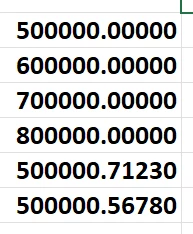

If there is no value in the decimal places (ie, 432,897.0000), it should be display the data by removing the decimal places - eg, 432,897 or 1,234,987.
If there is some value in the decimal places (ie, 432,897.5000), we keep two decimal places.  Display the data into the decimal values. Eg, 432,897.50 or 2,654,684.90.


Advanced 

thanks

2 replies

Manoj_Kumar
Community Advisor
Community Advisor
March 26, 2026

Did you try the toDouble,toDecimal or toFloat functions?

Manoj  | https://themartech.pro
AmitVishwakarma
Community Advisor
Community Advisor
March 26, 2026

Hi ​@SatyanarayanaCh 

You can do this with a small JavaScript helper in the Advanced personalisation:

<%
function formatAmount(str) {
if (!str) return "";

// Remove thousands separators from inbound string
var clean = String(str).replace(/,/g, "");

// Split integer/decimal parts
var parts = clean.split(".");
var intPart = parts[0];
var decPart = parts.length > 1 ? parts[1] : "";

// If decimal part is empty or numerically zero -> show as integer only
if (!decPart || parseInt(decPart, 10) === 0) {
var nInt = parseInt(intPart, 10);
if (isNaN(nInt)) return str;
return nInt.toString().replace(/\B(?=(\d{3})+(?!\d))/g, ",");
}

// If decimal part has value -> show with 2 decimals
var n = parseFloat(clean);
if (isNaN(n)) return str;
return n.toFixed(2).replace(/\B(?=(\d{3})+(?!\d))/g, ",");
}

// Example: amountStr coming from inbound transition (targetData / vars / ctx)
var amountStr = vars.inAmount; // adapt this: e.g. targetData.amount or rtEvent.ctx.amount
%>

<%= formatAmount(amountStr) %>

Behavior:

  • "432,897.0000" > 432,897
  • "432,897.5000" > 432,897.50

Just replace vars.inAmount with your actual inbound field (e.g. targetData.amount or recipient.@amount).

Amit Vishwakarma - Adobe Commerce Champion 2025 | 16x Adobe certified | 4x Adobe SME