How to alert the different results from a split activity into a single alert? | Community
Skip to main content
Level 6
September 3, 2024
Solved

How to alert the different results from a split activity into a single alert?

  • September 3, 2024
  • 1 reply
  • 688 views

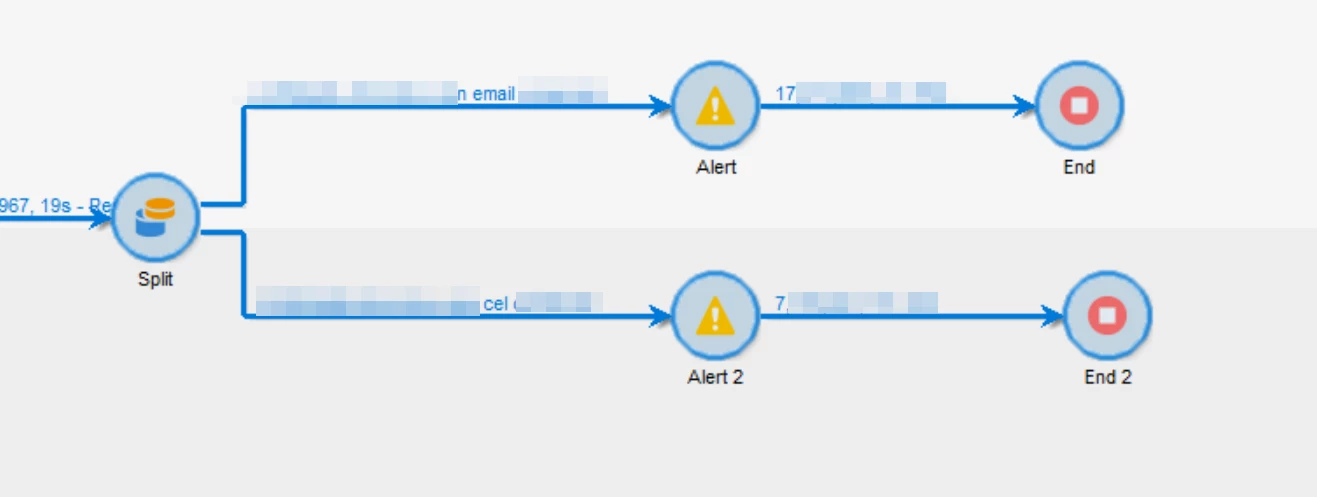
I'm using an split activity to count how many recipients have field A and how many have field B.

Since those are 2 segments inside the split activty I get 2 outputs. I can send an alert for each output, but I need to send a single email containing both counts of Field A and Field B.

How to do it? 

Each alert has this format: Hoy <%= formatDate(new Date(), "%2D/%2M/%2Y") %>  la cantidad de recipients con Email Comercial es:  <%= vars.recCount %> 

Bonus: how to format the <%= vars.recCount %>  so it shows a "," for the thousends?


This post is no longer active and is closed to new replies. Need help? Start a new post to ask your question.
Best answer by ParthaSarathy

Hi @god_prophet ,

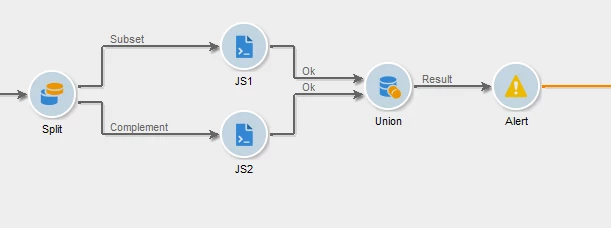
Use JS activity after both split transitions and store its recCount in a variable.


//JS1 activity vars.field1 = vars.recCount; //JS2 activity vars.field2 = vars.recCount;

And Union both the transition results and call this variable in alert activity.

1 reply

ParthaSarathy
Community Advisor
ParthaSarathyCommunity AdvisorAccepted solution
Community Advisor
September 3, 2024

Hi @god_prophet ,

Use JS activity after both split transitions and store its recCount in a variable.


//JS1 activity vars.field1 = vars.recCount; //JS2 activity vars.field2 = vars.recCount;

And Union both the transition results and call this variable in alert activity.

~  ParthaSarathy S~  Click here to join ADOBE CAMPAIGN USER GROUP for Quarterly In-person | Hybrid | Virtual Meetups
Level 6
September 3, 2024

Hi Partha, do you know how to format: 


vars.field1 = vars.recCount

So instead of seeing: 1723232, it shows: 1,723,232?? In the email send?

harikrishnadevanabowina
Level 4
September 4, 2024

Hi @god_prophet 


Try using 

vars.field1 = vars.recCount.toLocaleString();