How to add 2 attachment coming from data extraction activity in Recurring delivery activity | Community
Skip to main content
Level 4
September 6, 2024
Solved

How to add 2 attachment coming from data extraction activity in Recurring delivery activity

  • September 6, 2024
  • 1 reply
  • 1005 views

Hi all,


@parthasarathy 

need one help based on your old post

https://experienceleaguecommunities.adobe.com/t5/adobe-campaign-classic-questions/how-to-fetch-total-count-of-opens-and-clicks-for-the-specific/m-p/646792#M21154

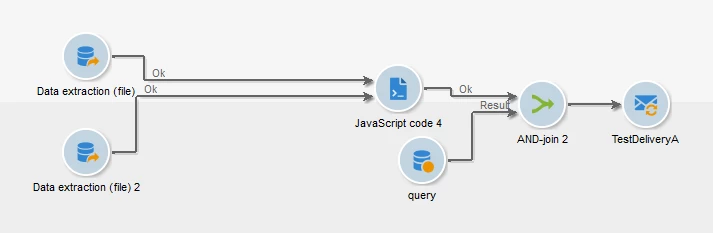
I need to add 2 attachment coming from data extraction activity in Recurring delivery activit
  1.  

  2. Data extraction activity1:filetest.csv and Data extraction activity2:filetest.csv

  3. JS activity:

  4. instance.vars.filetest = vars.filename;
    instance.vars.filetest = vars.filename1;

cOde in open tab of recurring delivery:


delivery.attachment.add(
<attachment compressMode="print" filterActive="false" label="my label"
nameScriptActive="false" type="normal" upload="false">
<name>{instance.vars.filetest,instance.vars.filetest1}</name>
</attachment>)
delivery.hasAttachments = true

Reference

however with below workflow I am able to get 1 attachment in delivery as I am sending only 1 file here
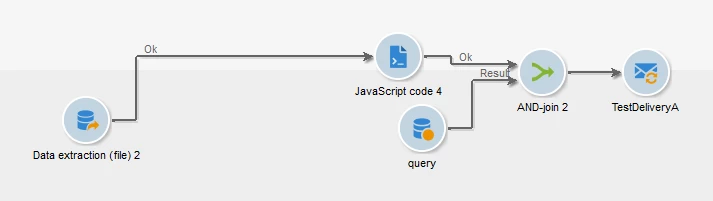


can un please help me here how can i send 2 attachments via one delivery

how can i modify the code and where



This post is no longer active and is closed to new replies. Need help? Start a new post to ask your question.
Best answer by ParthaSarathy

Hi @dishasharma ,

Store both file name in 2 different variables, and use the below script in delivery

delivery.attachment.add( <attachment compressMode="print" filterActive="false" label="my label" nameScriptActive="false" type="normal" upload="false"> <name>{instance.vars.file_1}</name> </attachment>); delivery.attachment.add( <attachment compressMode="print" filterActive="false" label="my label" nameScriptActive="false" type="normal" upload="false"> <name>{instance.vars.file_2}</name> </attachment>); delivery.hasAttachments = true

1 reply

ParthaSarathy
Community Advisor
ParthaSarathyCommunity AdvisorAccepted solution
Community Advisor
September 6, 2024

Hi @dishasharma ,

Store both file name in 2 different variables, and use the below script in delivery

delivery.attachment.add( <attachment compressMode="print" filterActive="false" label="my label" nameScriptActive="false" type="normal" upload="false"> <name>{instance.vars.file_1}</name> </attachment>); delivery.attachment.add( <attachment compressMode="print" filterActive="false" label="my label" nameScriptActive="false" type="normal" upload="false"> <name>{instance.vars.file_2}</name> </attachment>); delivery.hasAttachments = true
~  ParthaSarathy S~  Click here to join ADOBE CAMPAIGN USER GROUP for Quarterly In-person | Hybrid | Virtual Meetups
Level 4
September 6, 2024

@parthasarathy 


Hi, Thanks for your reply..

but I have tried the script which u mentioned in delivery activity

but with this script my delivery is getting failed, it is NOT Getting to finished state

It seems may be something wrong m doing, can u please tell me what should I put in Javascript activity, may be this is the issue

below code i am using in Javascript activity


instance.vars.file_1=vars.filename1;
instance.vars.file_2=vars.filename2;


Please let me know if this fine or I need to make some changes


ParthaSarathy
Community Advisor
Community Advisor
September 6, 2024

@dishasharma , Use the below script in its respective JS activity,


//JS 1 activity: instance.vars.file_1 = vars.filename; //JS 2 activity: instance.vars.file_2 = vars.filename;
~  ParthaSarathy S~  Click here to join ADOBE CAMPAIGN USER GROUP for Quarterly In-person | Hybrid | Virtual Meetups