How to access the XML of a workflow? | Community
Skip to main content
Level 6
June 1, 2024
Solved

How to access the XML of a workflow?

  • June 1, 2024
  • 3 replies
  • 1146 views

I have a workflow failing because the person who created it does not work any longer with us. 

I've changed the "assiged to" , in the edit tab, to a current employee. Still the error mentions that the ex employee has no the necesarry permissions to change it. 

I've found this documentation and it says I need to access the XML of the workflow to fix it. How to do that?

Unable to start workflow | Adobe Campaign

This post is no longer active and is closed to new replies. Need help? Start a new post to ask your question.
Best answer by Manoj_Kumar

Hello @god_prophet 


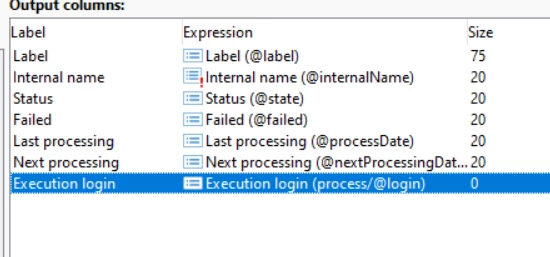
Update the value of execution login (highlighted in the screenshot below) to your operator and restart the WF.


3 replies

Heku_
Level 5
June 1, 2024

Hello, @god_prophet, to access the XML of the workflow you can double click a workflow to open it, then you can right click anywhere inside the workflow editor and choose the option "Edit XML Source", it's a very useful option and now you know how to access it!

Hope this helps!

ParthaSarathy
Community Advisor
Community Advisor
June 2, 2024

Hi @god_prophet ,

This issue will be fixed by Restarting the workflow with existing user.

~  ParthaSarathy S~  Click here to join ADOBE CAMPAIGN USER GROUP for Quarterly In-person | Hybrid | Virtual Meetups
Manoj_Kumar
Community Advisor
Manoj_KumarCommunity AdvisorAccepted solution
Community Advisor
June 2, 2024

Hello @god_prophet 


Update the value of execution login (highlighted in the screenshot below) to your operator and restart the WF.


Manoj  | https://themartech.pro