how download a file from azure blob | Adobe Higher Education
Skip to main content
September 28, 2021
Risolto

how download a file from azure blob

  • September 28, 2021
  • 3 risposte
  • 4989 visualizzazioni

Hi everyone, 


I have a problem when I tried to download a file from the azure blob storage account. I configured the external account and test it uploading a csv file and it works.


Now I want to download a cvs from there but the logs said "0 file(s) to transfer", I configure a second file transfer activity with the action "test to see if the file exist" and response the file exist.
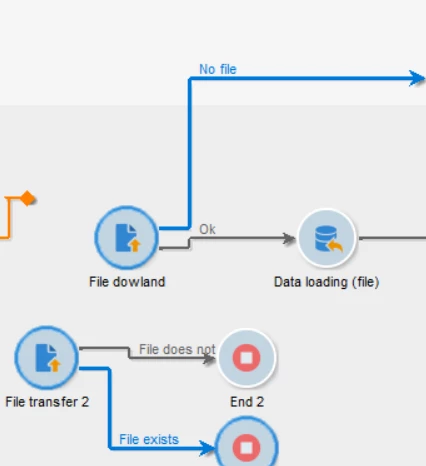


I'm not sure if I forgot configure something in the azure account o in campaign.


I hope someone can help me and thanks.

Questo argomento è stato chiuso alle risposte.
Migliore risposta di DebTr

Hi @aarg,

As per your above screenshot, I have seen the same behaviour earlier. In the “server folder”, if you put the directory and hat codes file name it doesn’t work. But if you mention the server folder along with file name in a variable it works.

 You can validate that in your workflow as well.


Cheers,

Deb


3 risposte

Adobe Employee
September 28, 2021

Hi @aarg ,

Can you provide the logs for the files exists and fle download.

May be the file doesn't exists in the provided path.

- Malarrajan Sundarraj

aargAutore
September 28, 2021

The file exist.

When I specify the file name in the file transfer

This are logs:

09/28/2021 5:32:45 PM 0 file(s) to transfer
09/28/2021 5:32:45 PM Starting file listing 'http://{myaccount}.blob.core.windows.net/entrada/tips/{fileName}20210928.csv'


But if only send the container and the folder, the activity download the file 

This are logs:

09/28/2021 5:54:22 PM File transfer completed
09/28/2021 5:54:22 PM Starting transfer of 'http://{myaccount}.blob.core.windows.net/entrada/tips/{filename}20210928.csv' to '{filename}20210928_20210928165422a.csv'
09/28/2021 5:54:22 PM 1 file(s) to transfer
09/28/2021 5:54:21 PM Starting file listing 'http://{myaccont}.blob.core.windows.net/entrada/tips/'


Now I want to understand if this is the normal behavior,because is possible the client want to store all the files  and I only want the most recent in campaign describes in the name file,  I'm trying to migrate the SFTP to blob and in the first one I can specify the file name, like this


Thanks 


Adobe Employee
September 28, 2021

Hi @aarg ,

Check on the filename and date concatenation part. Is there any white space in between.

It should match the entire filename and operation should be download.

- Malarrajan Sundarraj

DebTrRisposta
Level 6
September 28, 2021

Hi @aarg,

As per your above screenshot, I have seen the same behaviour earlier. In the “server folder”, if you put the directory and hat codes file name it doesn’t work. But if you mention the server folder along with file name in a variable it works.

 You can validate that in your workflow as well.


Cheers,

Deb


LiviaD1
Level 3
April 1, 2022

Hi @debtr , I'm trying your suggested solution but I still had the same error:
01/04/2022 17:50:31 fileTransfer No file to transfer found
01/04/2022 17:50:31 fileTransfer 0 file(s) to transfer
01/04/2022 17:50:30 fileTransfer Starting file listing 'xxx'

Just to be sure I correctly understood your solution, these are the screen how I set File Transfer activity:
Tab File Transfer

Tab Advanced


Is it correct? Thank you

Level 6
April 1, 2022

Hi @liviad1 ,

Can you try enabling the session log and check the workflow log. That may help you fig out the issue and are you sure that the folder and file name are being set up correctly on the variable?


Sukrity_Wadhwa
Community Manager
Community Manager
October 6, 2021

Hi @aarg,

Were you able to resolve this query with the help of any of the given solutions or do you still need more help here? Do let us know.
Thanks!

Sukrity Wadhwa