How do we enable SQL logs in ACC Client console 7.3.2 workflow UI dashboard ? | Community
Skip to main content
Level 3
June 29, 2023
Solved

How do we enable SQL logs in ACC Client console 7.3.2 workflow UI dashboard ?

  • June 29, 2023
  • 2 replies
  • 1738 views

Hi All,


I'm trying to look for SQL logs (see below image) under the audit tab in ACC client console 7.3.2 edit workflow UI dashboard. But cannot seem to find it in my current ACC UI. Is there an option to enable SQL logs? Or it is available only in campaign V8?
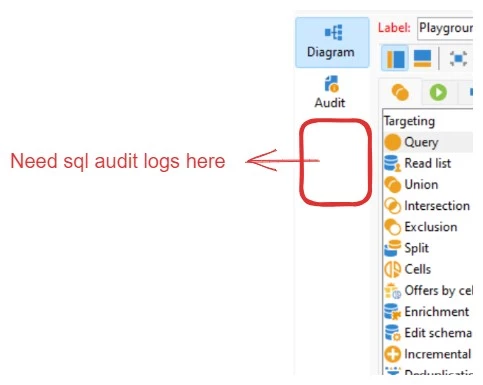


Image of workflow dashboard in ACC client console 7.3.2.


Thank you,

Rutuja Kelkar
https://rutujakelkar.com/


This post is no longer active and is closed to new replies. Need help? Start a new post to ask your question.
Best answer by ParthaSarathy

Hi @rut7 ,

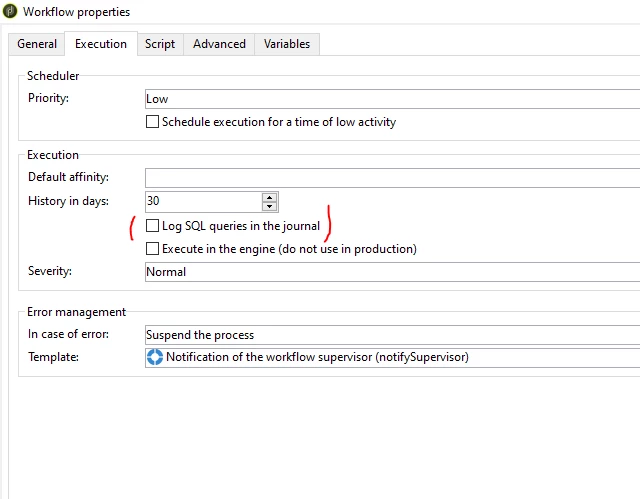
Go to workflow property > execution tab > enable 'Log SQL queries in the journal' checkbox


2 replies

Level 2
June 29, 2023

Hi @rut7 ,

Under the Workflow properties->Execution Tab->select checkbox for enabling SQL logs. PFB snapshot


Thanks,
Rahul Kad


ParthaSarathy
Community Advisor
ParthaSarathyCommunity AdvisorAccepted solution
Community Advisor
June 29, 2023

Hi @rut7 ,

Go to workflow property > execution tab > enable 'Log SQL queries in the journal' checkbox


 ~  ParthaSarathy S~  Click here to join ADOBE CAMPAIGN USER GROUP for Quarterly In-person | Hybrid | Virtual Meetups
Rut7Author
Level 3
June 29, 2023

Perfect, Thank you @parthasarathy @rahul_kad.


SQL query logs appears, but displays empty content (see Image 1)? Any reason for this? (Although I can SQL query logs in workflow properties - see image 2)

Image 1


Image 2


rahulkad29786
Level 4
June 29, 2023

Hi @rut7 ,

Can you just try clearing instance cache or restarting the Workflow once.

Let me  know if it helps.

Thanks