How do I enable an IP address to use the API? | Community
Skip to main content
Level 2
April 10, 2019
Solved

How do I enable an IP address to use the API?

  • April 10, 2019
  • 1 reply
  • 4134 views

Hi

I have been testing making some requests via the API which work great when done manually from my PC (which is on a network with an IP approved to access our instance).

I would like to be able to trigger the start of some workflows based on events outside Campaign (to cut down the number of times they run - currently scheduled to run frequently at set times), so I have been trying to set up a script on a server to do this.

I added the server's IP address to the 'Administration/Configuration/Security Zones' section of Campaign but am still getting the message "IP address via which you are accessing the server is not accepted. Connection refused." - are there further steps I need to do to enable this IP to connect?

Thanks

Stephen

This post is no longer active and is closed to new replies. Need help? Start a new post to ask your question.
Best answer by DavidKangni

Hi Stephen,

Two kinds of Security Zone entries can be managed:

  • Entries for the vpn security zone. These entries inherit all the permissions assigned to the vpn security zone and allowing all users assigned to the vpn security zone to access the system. These entries are to be used for Windows Console users. (client console access)
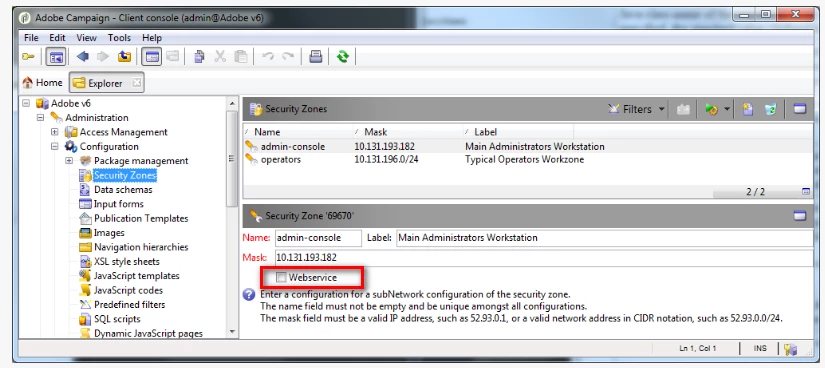
  • Entries for a web services security zone. These entries inherit all the permissions of the vpn security zone and are granted the allowUserPassword and sessiontokenOnly permissions. These entries are to be used for web services consumers. (web forms, internet access, API calls,)

That being said make sure the webservices option is checked

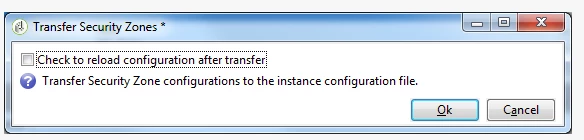
  • To immediately test your configurations click the Transfer Security Zones button to show this dialog:

To have it reloaded and thus activated immediately check the Check to reload configuration after transfer box.

Thanks

David

1 reply

DavidKangni
Community Advisor
DavidKangniCommunity AdvisorAccepted solution
Community Advisor
April 10, 2019

Hi Stephen,

Two kinds of Security Zone entries can be managed:

  • Entries for the vpn security zone. These entries inherit all the permissions assigned to the vpn security zone and allowing all users assigned to the vpn security zone to access the system. These entries are to be used for Windows Console users. (client console access)
  • Entries for a web services security zone. These entries inherit all the permissions of the vpn security zone and are granted the allowUserPassword and sessiontokenOnly permissions. These entries are to be used for web services consumers. (web forms, internet access, API calls,)

That being said make sure the webservices option is checked

  • To immediately test your configurations click the Transfer Security Zones button to show this dialog:

To have it reloaded and thus activated immediately check the Check to reload configuration after transfer box.

Thanks

David

David Kangni