how can we find last delivery sent to all rceipients in adobe campaign via delivery table or broadlogrcp table? | Community
Skip to main content
Level 4
August 20, 2023
Solved

how can we find last delivery sent to all rceipients in adobe campaign via delivery table or broadlogrcp table?

  • August 20, 2023
  • 1 reply
  • 973 views

please help ,me here


how can we find last delivery sent to all rceipients in adobe campaign via delivery table or broadlogrcp table?


please help what condition we can put in which ytable aand get that data?

This post is no longer active and is closed to new replies. Need help? Start a new post to ask your question.
Best answer by ParthaSarathy

Hi @shrutii ,

In Query,

Select targeting and filtering dimension as nms:recipient.

In filtering condition of the query, give, Recipient delivery logs (broadLogRcp) exists and click on finish and save the workflow.
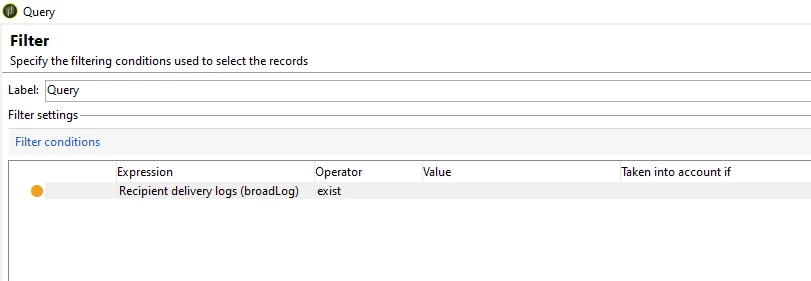
 

Open the query again > Add data > data linked to the filtering dimension >next> data linked to the filtering dimension > select 'Recipient delivery log (broadLogRcp) [one to many orange link] >next> 

data collected: limit the line count

Doubles to keep: 1

>Next>

In Sorting window, select broadLogRcp Event date and select descending as Yes, and in data to extract, select broadLogRcp's primary key and it's event date.


Run the workflow. You will be getting all the recipients who had received delivery earlier and their last delivery received date.

1 reply

ParthaSarathy
Community Advisor
ParthaSarathyCommunity AdvisorAccepted solution
Community Advisor
August 20, 2023

Hi @shrutii ,

In Query,

Select targeting and filtering dimension as nms:recipient.

In filtering condition of the query, give, Recipient delivery logs (broadLogRcp) exists and click on finish and save the workflow.


Open the query again > Add data > data linked to the filtering dimension >next> data linked to the filtering dimension > select 'Recipient delivery log (broadLogRcp) [one to many orange link] >next> 

data collected: limit the line count

Doubles to keep: 1

>Next>

In Sorting window, select broadLogRcp Event date and select descending as Yes, and in data to extract, select broadLogRcp's primary key and it's event date.


Run the workflow. You will be getting all the recipients who had received delivery earlier and their last delivery received date.

~  ParthaSarathy S~  Click here to join ADOBE CAMPAIGN USER GROUP for Quarterly In-person | Hybrid | Virtual Meetups
ShrutiiAuthor
Level 4
August 20, 2023

Hi Parth,thank you for reply but i need last modified date means i need only last date on which delivery is being sent to receipent,,,please help, how caan i get only last date on which delivery (max )is being sent to receipent, earlier ones i dont want