How can i transform a field into lowercase? | Community
Skip to main content
Level 2
July 18, 2023
Solved

How can i transform a field into lowercase?

  • July 18, 2023
  • 3 replies
  • 1285 views

Hi! the field @2503248 of my database is formated all in Uppercase (example: DAVID, JOHN,MARIE...) But i would like to personalise my  email delivery so i can use correctly the names (David, John, Marie).


How can i do to preserve the first letter as uppercase but transform the others to lowercase?


Thank you!

Best answer by LakshmiPravallika

Hi @javi_landa ,

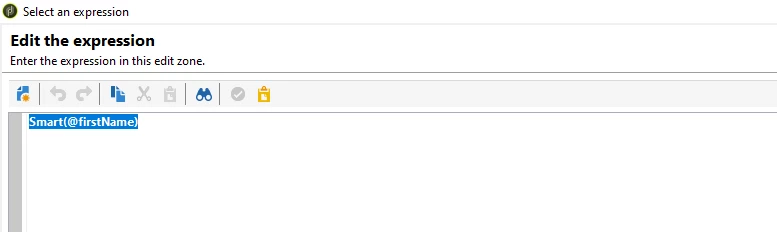
You can use the below in built function to convert the @FirstName of the Database Value to Proper Case(First Letter Upper Case and other letters in Lower Case), by below:


Inside the query activity pull @FirstName field, in the Additional Data section, configure the field in this way:


Smart(@firstName)


after doing this , try pulling the configured Variable inside the delivery activity as shown below:


Regards,

Pravallika.

3 replies

LakshmiPravallika
Community Advisor
LakshmiPravallikaCommunity AdvisorAccepted solution
Community Advisor
July 18, 2023

Hi @javi_landa ,

You can use the below in built function to convert the @FirstName of the Database Value to Proper Case(First Letter Upper Case and other letters in Lower Case), by below:


Inside the query activity pull @FirstName field, in the Additional Data section, configure the field in this way:


Smart(@firstName)


after doing this , try pulling the configured Variable inside the delivery activity as shown below:


Regards,

Pravallika.

Level 5
July 18, 2023

Hi @javi_landa ,

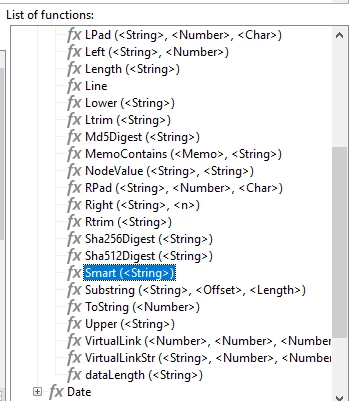
I just tested below function and it is working. You can use the same and it will convert into your use case. Just do the same in Enrichment Activity.


Regards

Abhishek


isahore
Community Advisor
Community Advisor
July 18, 2023

Hi @javi_landa,

alternatively, if you do not wish to use the enrichment and the "smart()" function - you can simply do the following in your email template:

<%= recipient.firstName.substring(0,1).toUpperCase()+recipient.firstName.substring(1,100).toLowerCase() %>

I am assuming that the field to be used for personalization is "firstName" in the recipient schema, and that the max length of the field is 100 characters. You can adjust these accordingly as per your data model and personalization need.


Regards,

Ishan