How can i retrieve the internal name of a workflow in other for segmentation within the same campaign? | Community
Skip to main content
Level 2
July 4, 2023
Solved

How can i retrieve the internal name of a workflow in other for segmentation within the same campaign?

  • July 4, 2023
  • 2 replies
  • 4349 views

Hi!

I am doing a campaign and i have 2 workflows. I want to exclude in the second workflow the recipients that have been contacted in the first workflow.

I know i need to call the internal name of workflow 1 and i know i need javascript for create the event variable. But i dont know how to do it.


Could you guys help me on that? 

This post is no longer active and is closed to new replies. Need help? Start a new post to ask your question.
Best answer by LakshmiPravallika

Hi @javi_landa ,


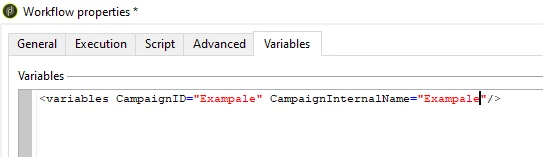
Firstly you need to define 2 Variables in the Campaign Workflow properties Tab as shown below


Then, please use the below JS Code to fetch the Internal name in the Java script activity of the Workflow


var query = xtk.queryDef.create(<queryDef schema="nms:operation" operation="select"><select><node expr="@id"/><node expr="@internalName"/>
</select>
<where><condition expr={"@id = '"+instance.operation_id+"'"}/></where>
</queryDef>);

var eventExistss = query.ExecuteQuery();

for each (var eventT in eventExistss.operation)
{
instance.vars.CampaignInternalName = eventT.@internalName;
instance.vars.CampaignID = eventT.@id;
}

logInfo("Campaign Internal Name: "+instance.vars.CampaignInternalName);

logInfo("Campaign ID: "+instance.vars.CampaignID);


Regards,

Pravallika.


2 replies

LakshmiPravallika
Community Advisor
LakshmiPravallikaCommunity AdvisorAccepted solution
Community Advisor
July 4, 2023

Hi @javi_landa ,


Firstly you need to define 2 Variables in the Campaign Workflow properties Tab as shown below


Then, please use the below JS Code to fetch the Internal name in the Java script activity of the Workflow


var query = xtk.queryDef.create(<queryDef schema="nms:operation" operation="select"><select><node expr="@id"/><node expr="@internalName"/>
</select>
<where><condition expr={"@id = '"+instance.operation_id+"'"}/></where>
</queryDef>);

var eventExistss = query.ExecuteQuery();

for each (var eventT in eventExistss.operation)
{
instance.vars.CampaignInternalName = eventT.@internalName;
instance.vars.CampaignID = eventT.@id;
}

logInfo("Campaign Internal Name: "+instance.vars.CampaignInternalName);

logInfo("Campaign ID: "+instance.vars.CampaignID);


Regards,

Pravallika.


Level 2
July 4, 2023

Okay! That has been very useful. But I have one last question.


Once you have named the temporay variable for the workflow internal name. How can be queried in the second one? Through "Recipient delivery log>Delivery/Workflow/@internalName" is correct?

LakshmiPravallika
Community Advisor
Community Advisor
July 4, 2023

Hi @javi_landa ,


Yes, you can use the query activity to fetch the other Workflows Internal Name as shown above.


The best solution for this would be either to use a List activity so that you will have an easy track of the Audience or the Delivery Code approach as suggested below.


The above JavaScript is helpful to fetch the Internal names and Campaign code rightly in a Campaign,


Regards,

Pravallika.

Level 5
July 4, 2023

Hi @javi_landa ,

The ideal way of doing the same is below :-


1. The recipient you are targeting in first workflow might have been saved somewhere like in your broadlog table or if same is not a case you can save the same in your own list.


2. In second workflow pick the recipients from list and exclude the same using your exclusion activity by doing reconciliation on any common parameter like Email or ID.


This is a recommended way of doing the same.


ParthaSarathy
Community Advisor
Community Advisor
July 4, 2023

Hi @javi_landa ,

Adding to @aggabhi  point, If you are using Delivery in Workflow-1 and you want to exclude those recipients in WKF-2 who has been targeted in WKF-1, you can try below approach,

While configuring all deliveries in WKF-1, in Delivery property > Delivery Code add a value (eg, workflow1)

And in your WKF-2, along with your targeting query condition, query - Recipient delivery Logs do not exist such as and (delivery/@deliveryCode) equals to workflow1. And in Blue highlighted area you can provide rest of the conditions to target recipients of WKF-2

(If you have multiple deliveries in WKF-1, in all deliveries you can give deliveryCode as workflow1)


Alternatively, by Using List:

In the end of WKF-1 you can use 'List update' activity and create a list.

In WKF-2, Use 'Read List' activity and call all recipients who has been targeted in WKF-1 and exclude them with Targeting query.


~  ParthaSarathy S~  Click here to join ADOBE CAMPAIGN USER GROUP for Quarterly In-person | Hybrid | Virtual Meetups
Level 2
July 4, 2023

Great, that is se interesting, but i came up with a question then. If i assign an internal name to a delivery such as "worklow1". How can actually relate that delivery with workflow 1?


I mean, i can use "workflow1" as an internal name for other delivery in other campaign and i will be selecting the incorrect one, isnt it?