How can I create delivery template blocks ? | Community
Skip to main content
Level 3
August 20, 2019
Solved

How can I create delivery template blocks ?

  • August 20, 2019
  • 1 reply
  • 1722 views

Hello everyone,

we are trying to create blocks (header block, primary block,) in delivery templates so that the content creator can utilize delivery templates flexibly.
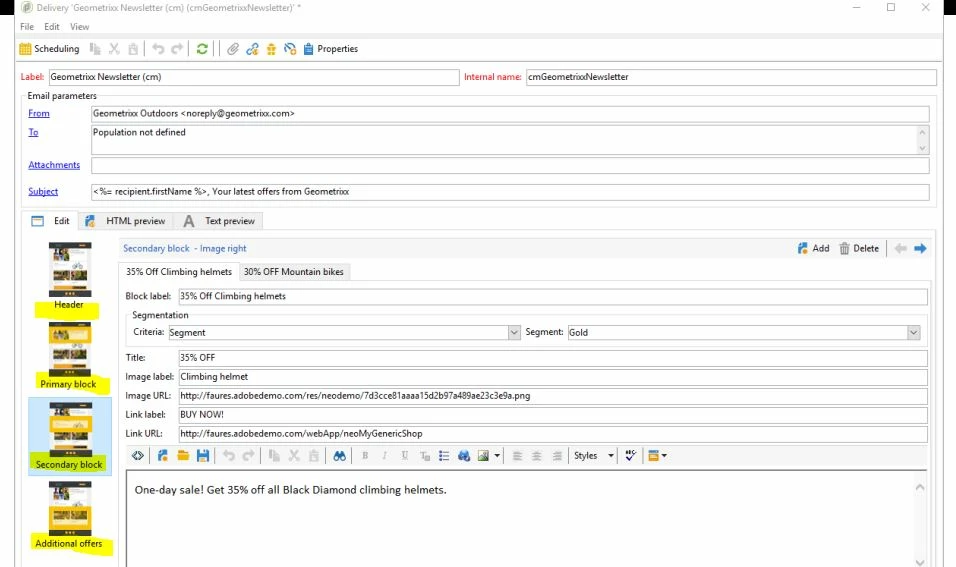
How can I create a delivery template with blocks like the above image?

Kind regards,

Imran

This post is no longer active and is closed to new replies. Need help? Start a new post to ask your question.
Best answer by Jonathon_wodnicki

Hi,

If the images there are checkboxes, it's just set the values in delivery metadata, read them in a control typology rule, compose the message from there. If they're inside a web control, you can have js copy them to the clipboard, then have marketers paste into the content. If they're intended to insert where the cursor is in the html editor, that isn't possible- use ootb personalization blocks for that, available in orange icon to the right of spellcheck.

Thanks,

-Jon

1 reply

Jonathon_wodnicki
Community Advisor
Jonathon_wodnickiCommunity AdvisorAccepted solution
Community Advisor
August 20, 2019

Hi,

If the images there are checkboxes, it's just set the values in delivery metadata, read them in a control typology rule, compose the message from there. If they're inside a web control, you can have js copy them to the clipboard, then have marketers paste into the content. If they're intended to insert where the cursor is in the html editor, that isn't possible- use ootb personalization blocks for that, available in orange icon to the right of spellcheck.

Thanks,

-Jon