Getting workflow's attributes | Community
Skip to main content
Level 3
January 16, 2024
Solved

Getting workflow's attributes

  • January 16, 2024
  • 1 reply
  • 608 views

Hi,


I am looking for the way to get the workflow's attributes (e.g. internal name, label or timezone) using the JS activity. I know that it is achievable by querying Workflow schema but I am looking for a universal method to always being able to get current workflow attributes.


Thanks,

Dominik

This post is no longer active and is closed to new replies. Need help? Start a new post to ask your question.
Best answer by Parvesh_Parmar

Hello @dwnuk ,

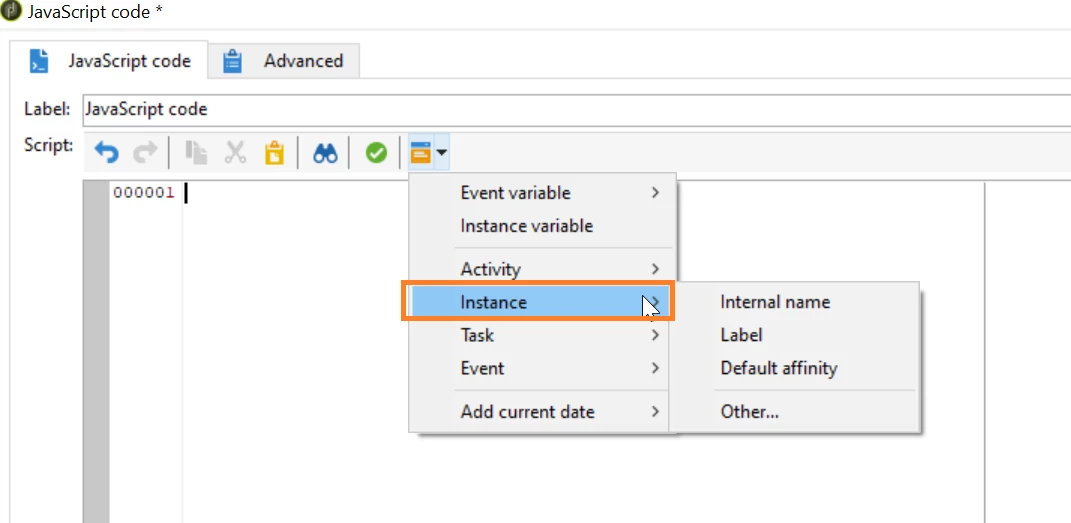
With the instance variable in a JavaScript activity, you can easily retrieve workflow attributes.

PFA: Screenshot


For e.g. if you want to obtain the value of the internal name of a workflow, you can achieve this through 'instance.internalName'.


Here's an example code snippet that prints the internal name of a workflow in a JavaScript activity:

logInfo(instance.internalName);


You can find the more details about the different type of variable on below link.


https://experienceleague.adobe.com/docs/campaign-classic/using/automating-with-workflows/advanced-management/javascript-scripts-and-templates.html?lang=en#instance-variables


Kr,

Parvesh


1 reply

Parvesh_Parmar
Community Advisor
Parvesh_ParmarCommunity AdvisorAccepted solution
Community Advisor
January 16, 2024

Hello @dwnuk ,

With the instance variable in a JavaScript activity, you can easily retrieve workflow attributes.

PFA: Screenshot


For e.g. if you want to obtain the value of the internal name of a workflow, you can achieve this through 'instance.internalName'.


Here's an example code snippet that prints the internal name of a workflow in a JavaScript activity:

logInfo(instance.internalName);


You can find the more details about the different type of variable on below link.


https://experienceleague.adobe.com/docs/campaign-classic/using/automating-with-workflows/advanced-management/javascript-scripts-and-templates.html?lang=en#instance-variables


Kr,

Parvesh


Parvesh Parmar – Adobe Community Advisor https://www.linkedin.com/in/parvesh-parmar/