Level 2
Aug 19, 2019 12:43 PM UTC
Solved

Getting error while creating New Folders

Hi Adobe Folks,

Whenever I am trying to create new folder in mya dobe campaign classic console, I am getting below error:
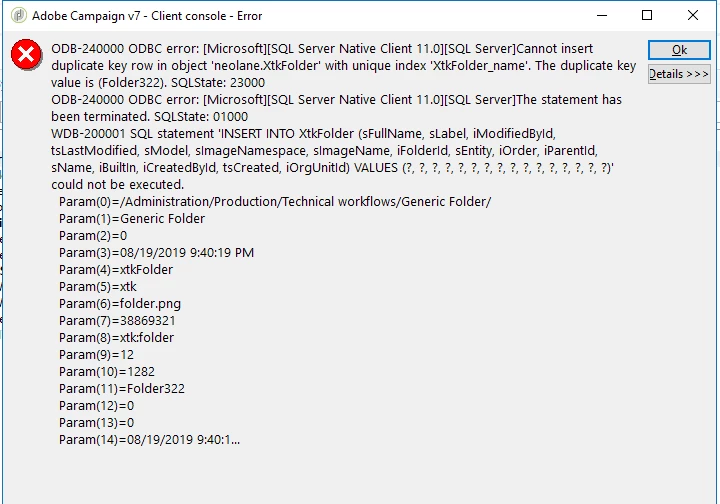
due to this error, not able to create any folder/new workflow.

Please help

Note - Adobe campaign is on-premise hosted.

Adhiyan​, Amit_Kumar​, Vipul Raghav​

This post is no longer active and is closed to new replies. Need help? Start a new post to ask your question.
Jonathon_wodnicki
Jonathon_wodnickiAccepted solution
Community Advisor
Aug 20, 2019 3:15 PM UTC

Hi,

Just keep retrying, eventually the counter will catch up; or set it directly, under Platform/Counters.

Also, set the instance prefix of each environment to the first letter of the env, 'D' for Dev, etc. This will make it so when users and untrained consultants don't name their objects and then export them across env's they won't collide.

Thanks,

-Jon

3 replies

Adhiyan
Adobe Employee
Adobe Employee
Aug 19, 2019 2:13 PM UTC

Hello Anoopa,

Is the error always referring to the same folder name i.e. - Folder322 or it's different each time.

The error tells us that there is a folder with that name already hence it's not able to create one again.

Also, can you share the steps you are taking to create the new folder.

Regards,

Adhiyan

Translate
Jonathon_wodnicki
Community Advisor
Jonathon_wodnickiCommunity AdvisorAccepted solution
Community Advisor
Aug 20, 2019 3:15 PM UTC

Hi,

Just keep retrying, eventually the counter will catch up; or set it directly, under Platform/Counters.

Also, set the instance prefix of each environment to the first letter of the env, 'D' for Dev, etc. This will make it so when users and untrained consultants don't name their objects and then export them across env's they won't collide.

Thanks,

-Jon

Translate
Level 2
Aug 21, 2019 12:28 PM UTC

Hi Jon,

I set the counter directly under Platform/Counter. It worked.

I will try to set instance prefix as well.

Thank you!

Anoop

Translate