Get list of recipients with deliveries and click/open/bounce data | Community
Skip to main content
Level 2
July 2, 2018
Solved

Get list of recipients with deliveries and click/open/bounce data

  • July 2, 2018
  • 1 reply
  • 2059 views

Hello Everyone,

   I have what I thought would be a straightforward question based on my previous experience in Eloqua, but for the life of me I cant figure this out.   All I'm trying to do is a get a list of email deliveries that have been sent for each recipient with counts of email opens, clicks, bounces, and unsubscribes.   I need to export that data to an SFTP location so I'm doing this through a Technical Workflow rather than a cube or some out of the box report.   Can anyone please give me the steps that would allow for this type of grouping and aggregation?  I'm very new to Adobe, so If you can provide step by step for the query I would be eternally grateful!

This post is no longer active and is closed to new replies. Need help? Start a new post to ask your question.
Best answer by Adhiyan

Hi Christopher,

The best way to do this is probably by exploring the calculated fields present in the nms:delivery table.

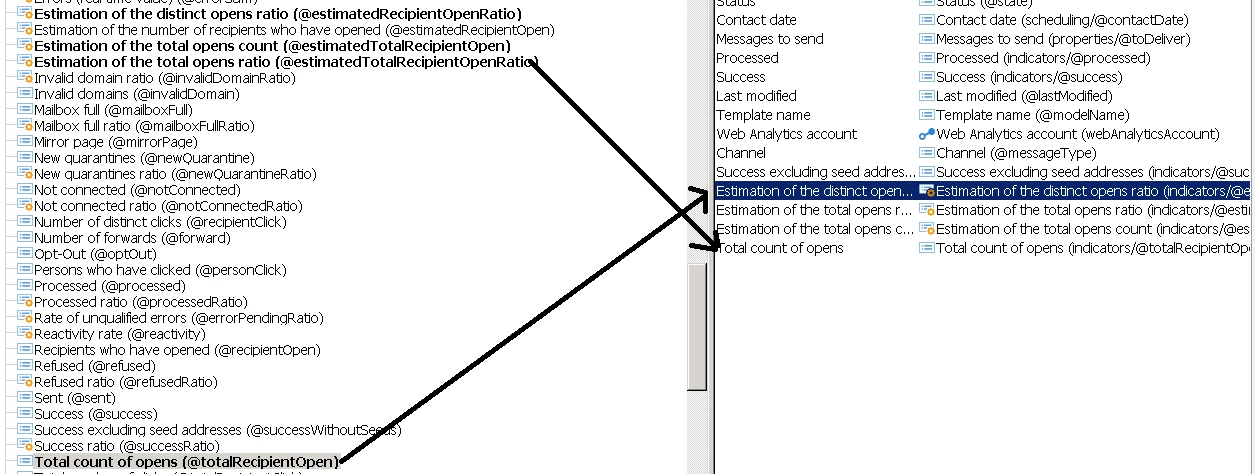
For example , by configuring the list in the delivery folder you can get data like opens , unique opens, clicks , unique clicks etc.

in this way , you can get the dashboard view of the delivery along with the number of clicks/opens etc.

1>.Get the details from the Configure list window into the delivery view

2>. Get the delivery name along with this metrics.

You can export the report from here

OR

You can apply this solution in a workflow as well by adding the required columns as additional data and then export them and send as a file etc.

Regards,
Adhiyan

1 reply

Adhiyan
Adobe Employee
AdhiyanAdobe EmployeeAccepted solution
Adobe Employee
July 4, 2018

Hi Christopher,

The best way to do this is probably by exploring the calculated fields present in the nms:delivery table.

For example , by configuring the list in the delivery folder you can get data like opens , unique opens, clicks , unique clicks etc.

in this way , you can get the dashboard view of the delivery along with the number of clicks/opens etc.

1>.Get the details from the Configure list window into the delivery view

2>. Get the delivery name along with this metrics.

You can export the report from here

OR

You can apply this solution in a workflow as well by adding the required columns as additional data and then export them and send as a file etc.

Regards,
Adhiyan