Filter delivery on DM iD? | Community
Skip to main content
Level 6
October 12, 2023
Solved

Filter delivery on DM iD?

  • October 12, 2023
  • 2 replies
  • 822 views

I have many deliveries in a Campaign, they all have the same label, since it is a recurring delivery. However, the differ in the DM part. 

Example: J_NEWUSERS (DM533015), J_NEWUSERS (DM537239)... and so on. Since I cannot filter by label because the have all the same label. How can I filter by DM in the explorer? In the AllDeliveries part.

This post is no longer active and is closed to new replies. Need help? Start a new post to ask your question.
Best answer by LakshmiPravallika

Hi @god_prophet ,


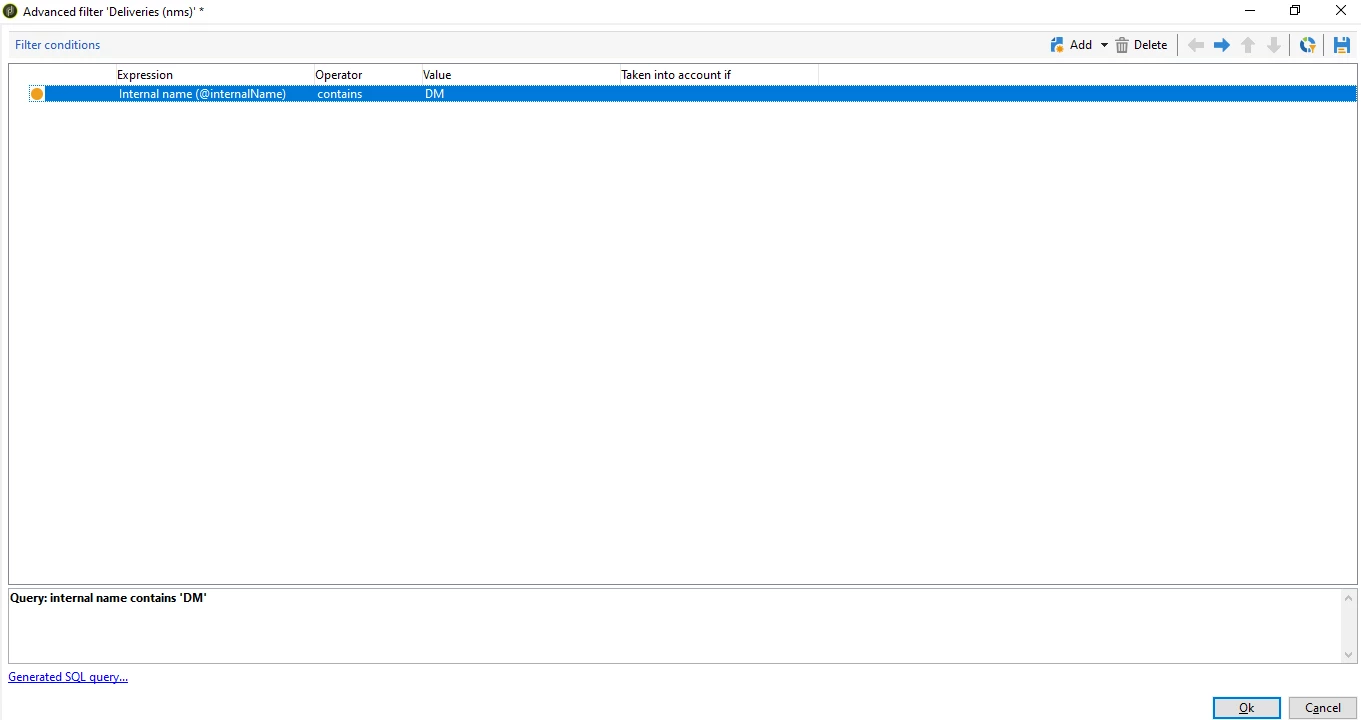
Please filter based on "Internal name"(@internalName) after going to "All Deliveries" Folder as shown below:


Regards,

Pravallika.

2 replies

LakshmiPravallika
Community Advisor
LakshmiPravallikaCommunity AdvisorAccepted solution
Community Advisor
October 12, 2023

Hi @god_prophet ,


Please filter based on "Internal name"(@internalName) after going to "All Deliveries" Folder as shown below:


Regards,

Pravallika.

ParthaSarathy
Community Advisor
Community Advisor
October 12, 2023

Hi @god_prophet ,

In top right of the All deliveries folder part, you will find 'filter'.

In the drop-down select 'By Label or Name'

Now in the search box, type DM533015

It will show you that particular delivery J_NEWUSERS (DM533015)


Or

All deliveries Part folder > top right - Filter > advanced filter > @internalName EQUALS TO DM533015


~  ParthaSarathy S~  Click here to join ADOBE CAMPAIGN USER GROUP for Quarterly In-person | Hybrid | Virtual Meetups