Filecolector "Stop as soon as a file has been processed" explanation | Community
Skip to main content
Marcel_Szimonisz
Community Advisor
Community Advisor
February 27, 2024
Solved

Filecolector "Stop as soon as a file has been processed" explanation

  • February 27, 2024
  • 1 reply
  • 1942 views

Hello Campaigners,

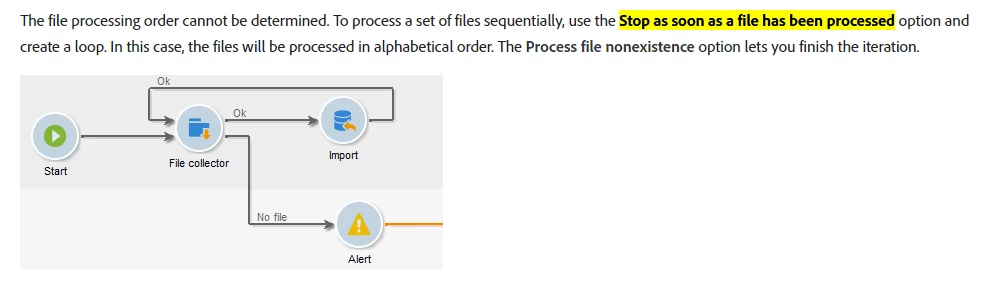
I have doubt around the option "Stop as soon as a file has been processed" in file collector anybody can share some insights to this?

For me there is no difference between checked and unchecked. 

https://experienceleague.adobe.com/docs/campaign-classic/using/automating-with-workflows/event-activities/file-collector.html?lang=en


The end goal is to figure out the order of files picked by the file collector.

Marcel


This post is no longer active and is closed to new replies. Need help? Start a new post to ask your question.
Best answer by ParthaSarathy

Hi @marcel_szimonisz ,
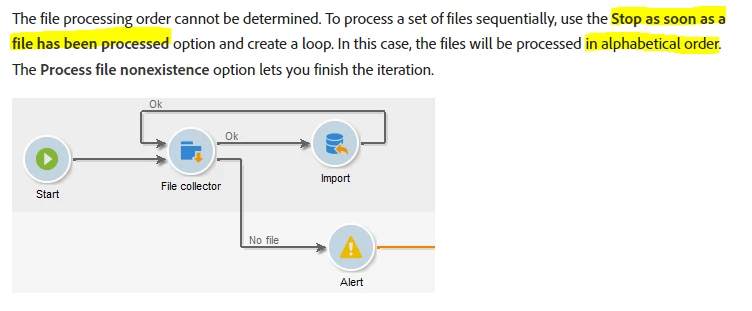
Yes, whether the check box is checked or unchecked, the files are getting processed sequentially in alphabetical order.

But few advantage of enabling the check box and making it as a loop (as above image) are,

- If there are multiple files in the directory, the file collector will fetch all the files together and once it gets picked up, it will move all the files to storage directory. And incase if there is any error in the workflow next to file collector, again we have to place all the files in the directory and rerun the workflow. But when having the loop concept, only one file will get moved to storage directory (if the workflow fails), and we can fix the Workflow and place that particular one file again and rerun the workflow.

- If keep interim of the workflow is enabled, We can able to monitor the performance and results of each file's data sequentially.

1 reply

ParthaSarathy
Community Advisor
ParthaSarathyCommunity AdvisorAccepted solution
Community Advisor
February 27, 2024

Hi @marcel_szimonisz ,

Yes, whether the check box is checked or unchecked, the files are getting processed sequentially in alphabetical order.

But few advantage of enabling the check box and making it as a loop (as above image) are,

- If there are multiple files in the directory, the file collector will fetch all the files together and once it gets picked up, it will move all the files to storage directory. And incase if there is any error in the workflow next to file collector, again we have to place all the files in the directory and rerun the workflow. But when having the loop concept, only one file will get moved to storage directory (if the workflow fails), and we can fix the Workflow and place that particular one file again and rerun the workflow.

- If keep interim of the workflow is enabled, We can able to monitor the performance and results of each file's data sequentially.

~  ParthaSarathy S~  Click here to join ADOBE CAMPAIGN USER GROUP for Quarterly In-person | Hybrid | Virtual Meetups
Marcel_Szimonisz
Community Advisor
Community Advisor
February 27, 2024

Hello @parthasarathy,

thanks for you reply.

So if I run the workflow as above but once with the checkbox checked and once unchecked. It will act the same only until the point the "Import" activity fails. Am I right?

Marcel

ParthaSarathy
Community Advisor
Community Advisor
February 28, 2024

If it is checked without the loop concept, then the file collector will fetch  only one file and complete the process.

~  ParthaSarathy S~  Click here to join ADOBE CAMPAIGN USER GROUP for Quarterly In-person | Hybrid | Virtual Meetups