Level 2
Mar 17, 2017 4:02 PM UTC
Solved

Fetch a parameter field/value

Hi,

I have a built the following workflow to extract Campaigns, Delivery associated each Campaign, Delivery Logs of each of the Deliveries

Stage-1 : Query Campaign

This extracts all the Campaigns.

Output Fields: Campaign Id, Campaign Label

Stage-2 : Enrichment with Delivery

This extracts the Delivery associated with each of the Campaigns extracted in Stage-1.

Output Fields: Campaign Id, Campaign Label, Delivery Id, Delivery Label

Stage-3 : Enrichment with Delivery Logs

This extracts the Delivery Logs associated with each of the Delivery extracted in Stage-2.

Output Fields: Campaign Id, Campaign Label, Delivery Id, Delivery Label

Stage-4 : Change dimension - Delivery Log

This changes the target dimension to Delivery Logs.

Stage-5 : Enrichment – Campaigns Deliveries and Delivery Logs

This enrichment simply adds the Delivery Logs fields to output. In Stage-3, it simply joined to Delivery Logs but any of the Delivery Logs fields were not taken to output.

Output Fields: Campaign Id, Campaign Label, Delivery Id, Delivery Label, Delivery Log Event Date, Status, Recipient Id, Scv Id


Stage-6 : Data extraction

The output of the Stage-5 is written to the file.

Output Fields: Campaign Id, Campaign Label, Delivery Id, Delivery Label, Delivery Log Event Date, Status, Recipient Id, Scv Id

This is working fine.

Now I would like to pull the “Subject” (i.e., Email Subject) from the “Email header parameters” associated with the Delivery schema.

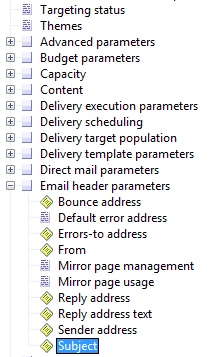
I can see the data item “Subject” and many more when browsed from the Source schema as shown below.

Browsed from the Source schema
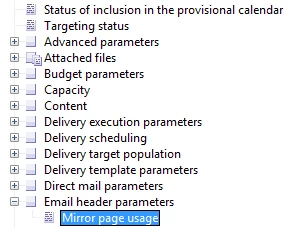
But, I can’t see the data item “Subject” and many more when browsed from the Query or Enrich activity as shown below.

Browsed from the Query or Enrichment
Could you please advise.

Regards,

Mahantesh

This post is no longer active and is closed to new replies. Need help? Start a new post to ask your question.
Florian_CourgeyAccepted solution
Level 4
Apr 22, 2019 9:17 PM UTC

Hi,

The subject is stored in the XML field mData which contains a lot of variables. You have to extract mData and get the subject via its XPath.

Workflow:

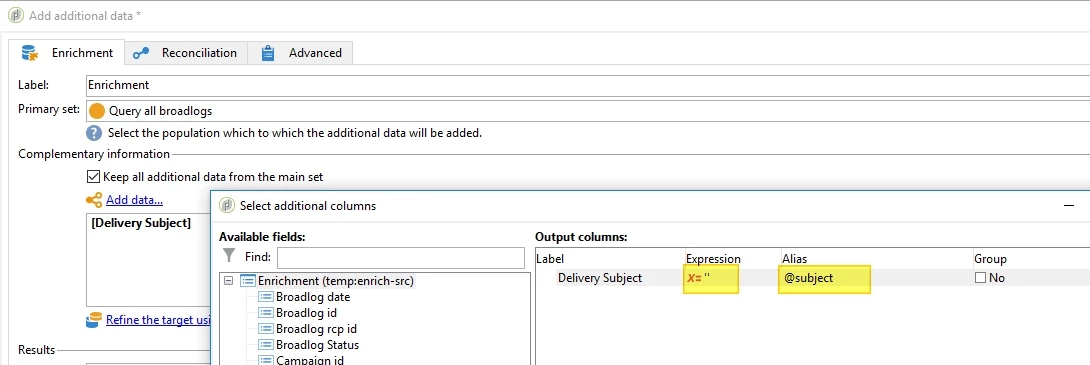
In your last Enrichment, create an empty column name @subject with '' as a value. This creates an SQL field named sSubject:

Add a Javascript activity between the Enrichment and the File Export, to fill in this new column:

// get data from previous transition

var query = xtk.queryDef.create({queryDef:{

  schema:vars.targetSchema, operation:"select",

  select:{node:[

    {expr:'@broadlogId'},

    {expr:'@deliveryId'},

  ]}

}});

var records = query.ExecuteQuery();

for each(var broadlog in records){ 

  var dataStr = sqlGetMemo("SELECT mData from nmsDelivery WHERE iDeliveryId="+broadlog.@deliveryId); // contains '<mailParameters mirrorPagePolicy="default" useDefaultErrorAddress="true"><subject><![CDA

  dataXml = DOMDocument.fromXMLString(dataStr);

  //var subject = dataXml.getElementsByTagName('mailParameters')[0].getValue('subject'); // equivalent to:

  var subject = dataXml.root.getValue('mailParameters/subject');

  if(subject){ // may be null

    var sql = "UPDATE "+vars.tableName+" SET "+

      "sSubject = '"+subject+"' "+

      "WHERE iId="+broadlog.@broadlogId+";";

    logInfo(sql);

    sqlExec(sql);

  }

}

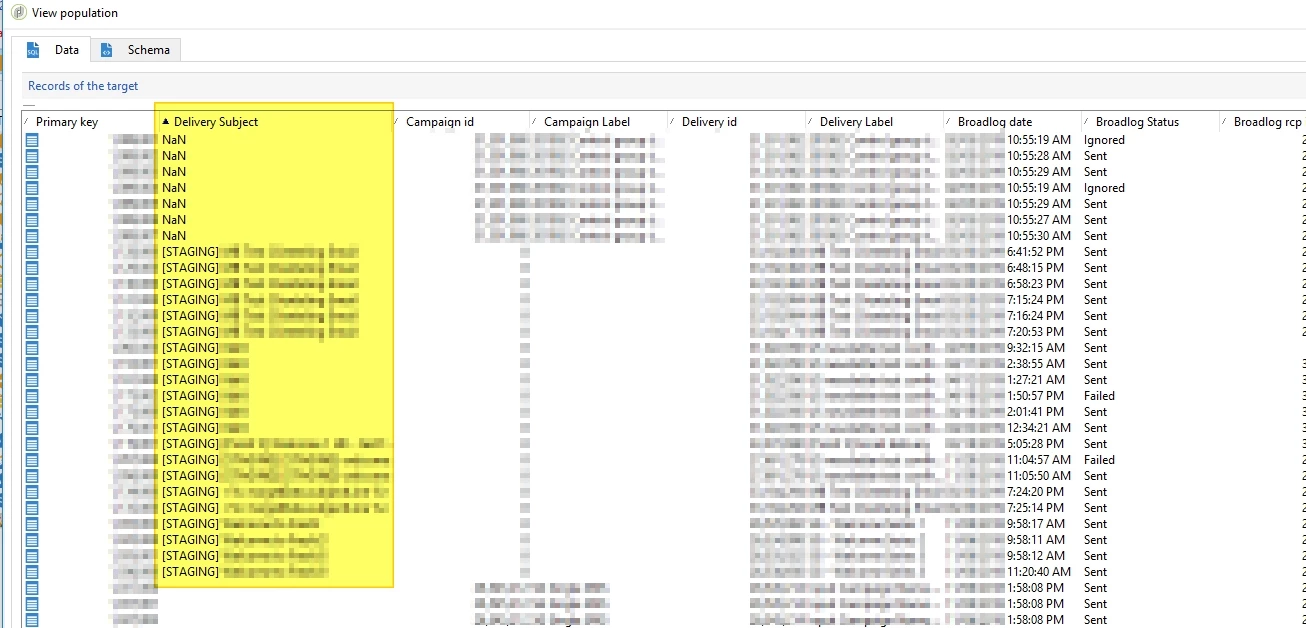
Display the target now gives us the subject:

PS: for better perfomance, I guess you don't need all those Enrichments. Just one query on BroadLogRcp and get the fields you need (even the "linked" ones to Delivery and Campaign)

10 replies

vraghav
Adobe Employee
Adobe Employee
Mar 19, 2017 5:42 AM UTC

Hi Mahantesh,

Subject is a computed XML field and at database level is stored in column named mdata.

Extracting it using the workflow menu items is not possible.

You can only do so using querydef.

Regards,

Vipul

Translate
MeMontyAuthor
Level 2
Mar 20, 2017 8:55 AM UTC

Hi Vipul,

Thanks for your response.

Could you please guide me, where (at what stage) & how can I achieve this in my workflow (explained in my initial post)?

Regards,

Mahantesh

Translate
nadeema90078524
Level 2
Jul 16, 2018 11:59 AM UTC

m

Translate
nadeema90078524
Level 2
Jul 16, 2018 12:00 PM UTC

I am creating a Cube on Tracking Log where email Subject is one such Dimension. How can i do that ? Do i need to use Query Def ?As its a Xml Type atribute.

Translate
Florian_CourgeyAccepted solution
Level 4
Apr 22, 2019 9:17 PM UTC

Hi,

The subject is stored in the XML field mData which contains a lot of variables. You have to extract mData and get the subject via its XPath.

Workflow:

In your last Enrichment, create an empty column name @subject with '' as a value. This creates an SQL field named sSubject:

Add a Javascript activity between the Enrichment and the File Export, to fill in this new column:

// get data from previous transition

var query = xtk.queryDef.create({queryDef:{

  schema:vars.targetSchema, operation:"select",

  select:{node:[

    {expr:'@broadlogId'},

    {expr:'@deliveryId'},

  ]}

}});

var records = query.ExecuteQuery();

for each(var broadlog in records){ 

  var dataStr = sqlGetMemo("SELECT mData from nmsDelivery WHERE iDeliveryId="+broadlog.@deliveryId); // contains '<mailParameters mirrorPagePolicy="default" useDefaultErrorAddress="true"><subject><![CDA

  dataXml = DOMDocument.fromXMLString(dataStr);

  //var subject = dataXml.getElementsByTagName('mailParameters')[0].getValue('subject'); // equivalent to:

  var subject = dataXml.root.getValue('mailParameters/subject');

  if(subject){ // may be null

    var sql = "UPDATE "+vars.tableName+" SET "+

      "sSubject = '"+subject+"' "+

      "WHERE iId="+broadlog.@broadlogId+";";

    logInfo(sql);

    sqlExec(sql);

  }

}

Display the target now gives us the subject:

PS: for better perfomance, I guess you don't need all those Enrichments. Just one query on BroadLogRcp and get the fields you need (even the "linked" ones to Delivery and Campaign)

Translate
Level 2
Oct 12, 2020 7:48 AM UTC
Hi Florian, I am trying in the same way as you described, but my query is having one error :
Translate
SurabattulaSr
Level 6
May 16, 2019 1:06 PM UTC

Hi Vipul Raghav

I too have similar requirement, where instead of Subject I need to fetch Delivery Content. I tried to use the same way, but facing numerous errors

It is present under delivery/content/html/source. Can you please help me how can i achieve this using queryDef? i don't have any enrichment activity or anything else, i just want to see response in the JS for my further processing

Regards,

Sri Bhargav

Translate