Export to PDF functionality not working in Campaign Classic
Hi All,
We are facing an issue while exporting PDF Reports of Email deliveries since last month in Adobe Campaign Classic. While exporting it waits about 2-3 minutes to generate the report and then we receive a pop-up window for saving the file locally but file downloaded locally will be having null size (0KB size). This file doesn't holds any content and it can't be opened in of the pdf readers.
But on the other hand for the same email delivery we are able to export it as Excel. There is no pop-up error messages coming in Campaign rich-client console.
Note here we are able to export and download to Excel reports in both xlsx & ods format without any troubles
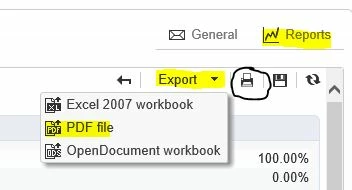
One strange behaviour is like we are able to get it saved locally in pdf format using the print option (using the circled print button).
From the application server logs we have noticed the below error message during this export.
2021-02-12 06:15:38.976Z 000075F1 00001210 1 error log XSV-350142 A problem occurred while creating the report: '[phantomJS]Unable to post to: https://xxxxx.yyyyy.com/report/me
ssageCenterExecutionTimes?__universe=reports&__securitytoken=%-------------************-------------------&_context=global&_reportLabel=Message%2520Center%2520processing%252
0time&_banimation=false\n'. (iRc=-53)
Current Campaign version: 9032 Gold Standard 11
We are not able to find any sultion for this issue from the past two months. Kindly help if someone of you have come across this starnge behaviour.
Thanks in advance.
--
Regards
Abin Cherish