EXCLUSION ERROR | Community
Skip to main content
Level 3
June 13, 2024
Solved

EXCLUSION ERROR

  • June 13, 2024
  • 2 replies
  • 723 views

Hi,


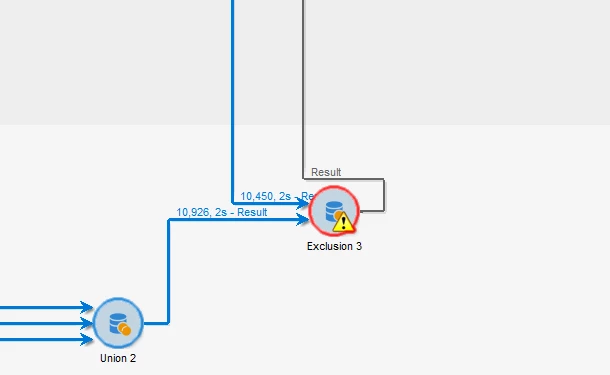
can someone explain whats the meaning of that red flag and how can I fix it? I cant find the way 😞


Thanks in advance as always


Kind regards,

Blanca


This post is no longer active and is closed to new replies. Need help? Start a new post to ask your question.
Best answer by vraghav

@bcollado this is happening either because the ID attribute in one of the two incoming transitions is holding string value and the expected value is Integer/long. Please refer to every single column and its data type to find the culprit.

2 replies

bcolladoAuthor
Level 3
June 13, 2024
 

Here you can find  the configuration of the activity... maybe it is because the second identifier is empty?

Level 2
June 13, 2024

Hi @bcollado ,


Ideally the error won't come even if its empty. Please try removing the Exclusion set entirely and give only the primary set if you have the Joining keys as the default keys for exclusion.


Also please cross check the data types of the keys in both the subsets , they have to be of  identical data types for the exclusion to work.


Regards,

Pravallika.

vraghav
Adobe Employee
vraghavAdobe EmployeeAccepted solution
Adobe Employee
June 19, 2024

@bcollado this is happening either because the ID attribute in one of the two incoming transitions is holding string value and the expected value is Integer/long. Please refer to every single column and its data type to find the culprit.

