Estimate the target of a send-out | Adobe Higher Education
Skip to main content
Level 4
November 9, 2022
Risolto

Estimate the target of a send-out

  • November 9, 2022
  • 1 risposta
  • 1837 visualizzazioni

Hello,

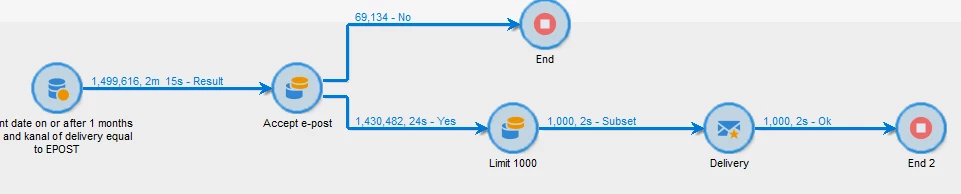
I have created some ad-hoc typology rules and I would like to see how many customers will get the email when I run the workflow.

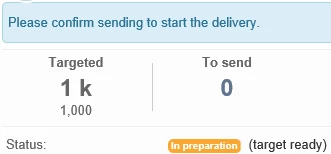
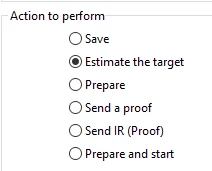
I have checked the box "Estimate the target" in the delivery node but I keep getting the whole target group and not the actual targeted group for the send-out:


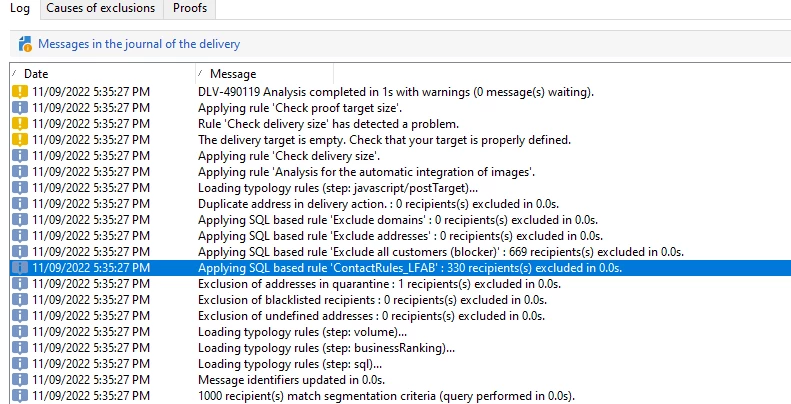
As you can see all customers are excluded in the log but visually in the workflow I get 1000 and not 0 as I want.


Questo argomento è stato chiuso alle risposte.
Migliore risposta di costa_n11

Hello Denis,


I have put special filters (contact rules filters based on delivery logs data) as typology rules and I would like to estimate the target before sending the email.


The final goal of the workflow is to send out an email to customers but I would like to test the amount of customers that go through the analysis phase in the delivery and see the amount in the workflow.


I could use "Prepare" in the delivery as suggested by Manoy but then the customers will get logs (a row with the delivery with status "Pending") in the broadlog table and it will interfere with the typology rules next time I run the workflow for sending out the email.


I hope it is a little bit cleared now but let me know if not so I'll try to take some screenshots.


Hi @a_b_se 

Valid requirements indeed sadly not sure you'll be able to realise it via the Delivery itself.

What i would suggest is to have your filter from the typology to be defined as pre-defined filter and use the pre-defined filter during the segmentation in the workflow. This way, you will ensure that the incoming audience in the delivery has already been analysed by these rules. You would still keep the rules as typology as a safety net in case they've been missed in the workflow.

Finally, it will become a modus operandi to the users to always use the pre-defined filters in their workflow.


As you've seen, using Estimate Target does not work as you think it will (I would have not recommended it either as it generates deliveries and temporary logs that would require to be purged) and, using Prepare although giving you the exact results, there would be a delivery created and logs that would have to be purged straightaway, so not ideal for your scenario either.


Doing these exclusions in the workflow  and using pre-defined filters to ease the creation of the workflow are probably a better solution.


Hope this helps,

Thanks

Denis


1 risposta

Manoj_Kumar
Community Advisor
Community Advisor
November 10, 2022

Hello @a_b_se 


Instead of "Estimate the Target" select the "Prepare" option. The delivery is showing the correct counts of 1000 because they were the total target. After preparation, the final counts will appear under the To Send section.

Manoj     Find me on LinkedIn
A_B_SEAutore
Level 4
November 10, 2022

Hello,


Thank you for your answer.

The problem is that if I use "Prepare" I will create logs in the Broadlog table and I do not want to have any trace of this delivery in the recipient delivery logs. With "Prepare" I will get a Pending delivery for every customers and it will affect then the Typology rule that I'm testing (since it is based on recipient delivery logs).

Adobe Employee
November 10, 2022

HI @a_b_se 

What are you trying to do exactly? have the target audience in the workflow itself with all the exclusion rules that a delivery will trigger? and then what? Will you trigger the delivery? Or would you add extra segmentation in the workflow prior a 2nd final delivery?

Could you clarify the goal of the workflow?

Thanks

Denis