Error while evaluating document - Attribute unkown | Community
Skip to main content
CampaignerForLife
Level 5
April 18, 2023
Solved

Error while evaluating document - Attribute unkown

  • April 18, 2023
  • 4 replies
  • 3307 views

I'm trying to do a nms.recipient.load() of one of my recipients in a Delivery, but it keeps giving me this error 


Error while evaluating document
Attribute 'compras' unknown (see definition of schema 'Recipients (nms:recipient)').
XTK-170036 Unable to parse expression '@compras-id'.
Element 'id' unknown (see definition of schema 'Recipients (nms:recipient)').
XTK-170036 Unable to parse expression '@compras-id'.
QUE-370014 Error during query generation (for a document of type 'Recipients (nms:recipient)').
SCR-160012 Javascript: error while evaluating script 'content htmlContent'.


Any idea? @heku_ @alnavarg @_manoj_kumar_ 

This post is no longer active and is closed to new replies. Need help? Start a new post to ask your question.
Best answer by Parvesh_Parmar

Hello @campaignerforlife ,


It seems that this attribute exist in schema but not in data base table.

This looks like a custom attribute (@compras-id') . It would not be available  out of box schema which you shared below. 


Can you please do the following check? 


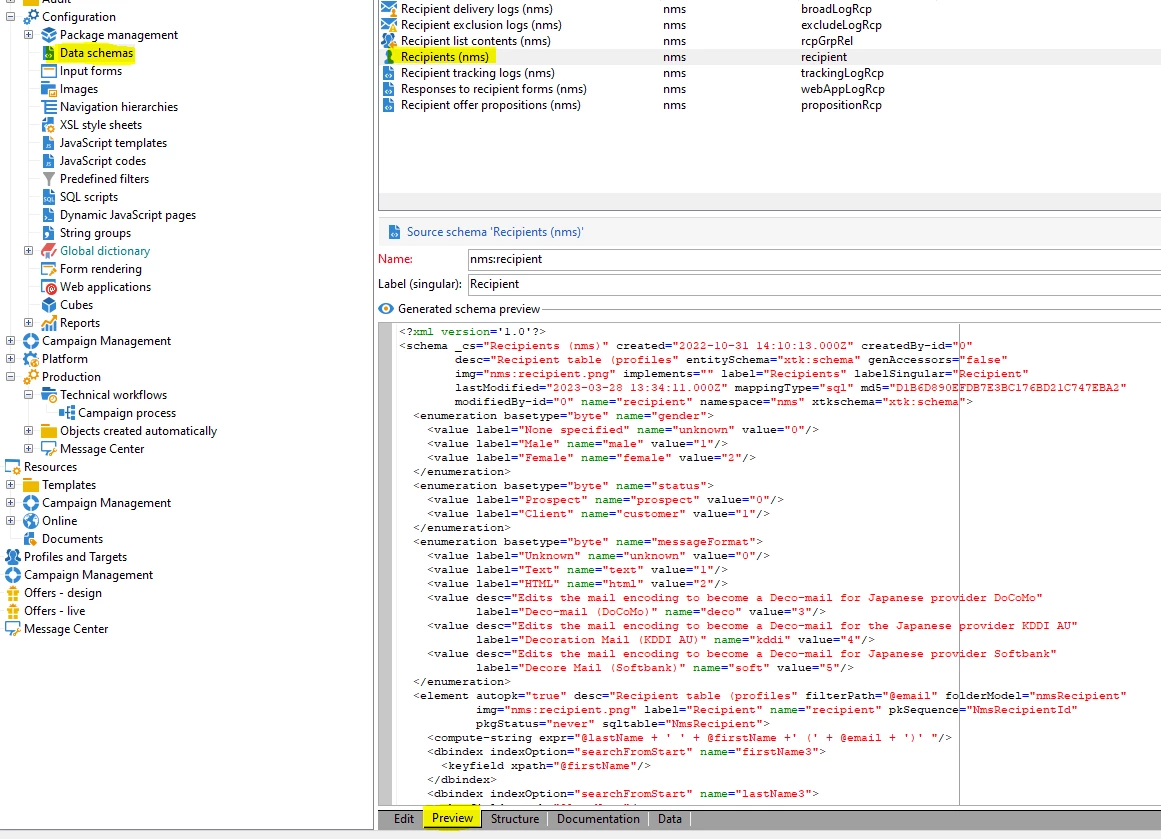
1.  Go to Administration -> Data schema -> nms:recipient -> Preview


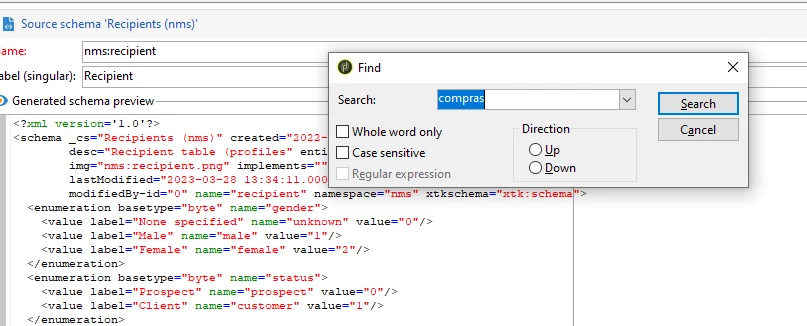
2. Enter Ctrl+F and search for @compras-id


3. If it is there, then it means it has been added in recipient extended schema. 

 Go to the recipient extended schema and make sure this attribute defined correctly.

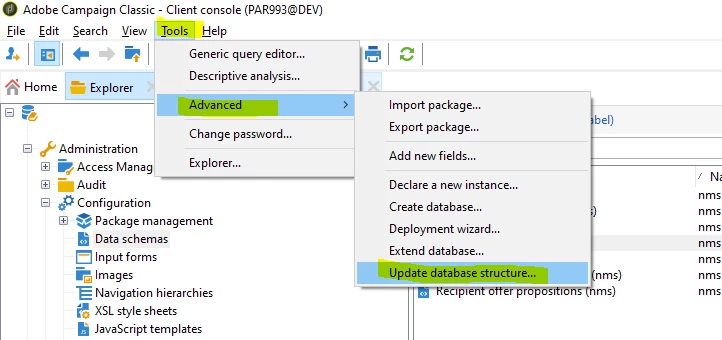
4. Go to the Update database structure.


5.  Click next and next. 

6. Then you would get the SQL code. You need to check if this filed is there under recipient. 

    If it is there, then it means it is not in SQL table. 

7. Click next and create this field in  data base.

8. Clean your cache and try again. 


Hope this will help you.


Kr, 

Parvesh


4 replies

CampaignerForLife
Level 5
April 19, 2023

Anyone knows??? I'm really needing help with this one @yansu @heku_ @alnavarg @_manoj_kumar_ @parvesh_parmar @bcollado1 @partha-1 

Manoj_Kumar
Community Advisor
Community Advisor
April 19, 2023

Hello @campaignerforlife 


Could you please share the code and the schema structure of recipient?

Manoj  | https://themartech.pro
CampaignerForLife
Level 5
April 19, 2023

Hello Manoj

<P> <% var Y = nms.recipient.load("1133542569"); %> <% var x = nms.recipient.create({recipient: { email: "support@adobe.com",lastName: "Adobe", firstName: "Support"}}); %></P> Hello, <%= x.firstName %></BODY></HTML>

This is the code i'm trying to use in a delivery.

The second one (Var x) works properly. The first one, var Y, will give me that error 

Parvesh_Parmar
Community Advisor
Parvesh_ParmarCommunity AdvisorAccepted solution
Community Advisor
April 19, 2023

Hello @campaignerforlife ,


It seems that this attribute exist in schema but not in data base table.

This looks like a custom attribute (@compras-id') . It would not be available  out of box schema which you shared below. 


Can you please do the following check? 


1.  Go to Administration -> Data schema -> nms:recipient -> Preview


2. Enter Ctrl+F and search for @compras-id


3. If it is there, then it means it has been added in recipient extended schema. 

 Go to the recipient extended schema and make sure this attribute defined correctly.

4. Go to the Update database structure.


5.  Click next and next. 

6. Then you would get the SQL code. You need to check if this filed is there under recipient. 

    If it is there, then it means it is not in SQL table. 

7. Click next and create this field in  data base.

8. Clean your cache and try again. 


Hope this will help you.


Kr, 

Parvesh


Parvesh Parmar – Adobe Community Advisor https://www.linkedin.com/in/parvesh-parmar/
CampaignerForLife
Level 5
April 26, 2023

Thank you Parvesh Parmar, this is definitely a game changer!

akshaaga
Adobe Employee
Adobe Employee
April 21, 2023

@campaignerforlife,

The error message you're seeing suggests that there's an issue with your expression syntax when trying to access the compras-id attribute of a recipient in a delivery.

You can try as below:

var recipient = nms.delivery.recipients.createCursor().first();

var comprasId = recipient.customData.compras.id;

This loads the first recipient in the delivery's recipients table and retrieves the value of the compras-id attribute from the recipient's customData field.

You can replace nms.delivery.recipients with nms.delivery.internalRecipients or nms.delivery.externalRecipients depending on the type of recipients you want to load.

Make sure that the attribute name you're trying to access is correct and matches the name defined in the recipient schema. Also, double-check that the recipient in question has a value set for that attribute.

Sukrity_Wadhwa
Community Manager
Community Manager
April 26, 2023

Hi @campaignerforlife,

Were you able to resolve this query with the help of the given solutions by @akshaaga & @parvesh_parmar, or do you still need more help here? Do let us know. In case the given solutions were helpful, then kindly choose the one that helped you the most as the 'Correct Reply'.
Thanks!

Sukrity Wadhwa