Error while creating Shared audience in ACC | Adobe Higher Education
Skip to main content
naveenj10058761
Level 3
July 31, 2019
Beantwortet

Error while creating Shared audience in ACC

  • July 31, 2019
  • 2 Antworten
  • 2907 Ansichten

Hi

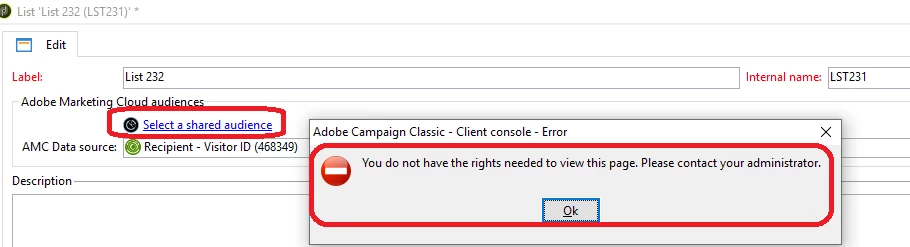
While creating a shared audience in ACC I am getting the permission error.

I have all the following required access.

- access to audience libraries

- Admin credentials

-File Access

-Import

-Insert Folders

-Program Execution

-Recipient Import

-SQL Script Execution

Can you please let me know what could be the reason for the error.
Dieses Thema wurde für Antworten geschlossen.
Beste Antwort von Marco_Campagnolo

Hi,

You have to check the external account configuration.

In particular:

On Campaign side:

  • Product Context: it can be left as blank (or dma_campaign) if Admin Console – Campaign Product Profiles looks like “CampaignV6 - <Experience Cloud Tenant> - <admin, etc...>” , otherwise, in case of CampaignV7 configuration, it should be dma_campaign_classic
  • The Tenant should point to the “PRODUCTION” Experience Cloud Tenant
  • The Association Mask MUST reflect the Product Profiles in Admin Console – Campaign. So, for example, if we have CampaignV6 – YXZ – admin, the Association Mask must be CampaignV6 – YXZ – (.*), it is a simple regex
  • IMS must be configured (and you have to access the instance with this user) in order to create the Lists for saving the shared audiences.

Everytime you modify a parameter in the external account, the web process should be restarted.

On Admin Console side:

  • The user should be assigned to the Audience Library – Product Profiles “Audience Library” – Users
  • The user should be assigned to the Campaign PROD environment – Desired Product Profile (i.e. CampaignV6 – YXZ – admin) -- Users

Hope this is helpful.

Best regards

2 Antworten

Adobe Employee
August 21, 2019

Hi,

You have to check the external account configuration.

In particular:

On Campaign side:

  • Product Context: it can be left as blank (or dma_campaign) if Admin Console – Campaign Product Profiles looks like “CampaignV6 - <Experience Cloud Tenant> - <admin, etc...>” , otherwise, in case of CampaignV7 configuration, it should be dma_campaign_classic
  • The Tenant should point to the “PRODUCTION” Experience Cloud Tenant
  • The Association Mask MUST reflect the Product Profiles in Admin Console – Campaign. So, for example, if we have CampaignV6 – YXZ – admin, the Association Mask must be CampaignV6 – YXZ – (.*), it is a simple regex
  • IMS must be configured (and you have to access the instance with this user) in order to create the Lists for saving the shared audiences.

Everytime you modify a parameter in the external account, the web process should be restarted.

On Admin Console side:

  • The user should be assigned to the Audience Library – Product Profiles “Audience Library” – Users
  • The user should be assigned to the Campaign PROD environment – Desired Product Profile (i.e. CampaignV6 – YXZ – admin) -- Users

Hope this is helpful.

Best regards

naveenj10058761
Level 3
August 26, 2019

Hi Marco,

Thanks for the reply.

The issue has been resolved now. The root cause of the error was tenant ID mismatch across AAM and ACC.

But, thanks for the above checklist; it is definitely helpful.

Cheers...

Naveen