Error in send Delivery | Community
Skip to main content
Level 2
July 27, 2022
Solved

Error in send Delivery

  • July 27, 2022
  • 1 reply
  • 1370 views

Good Morning,


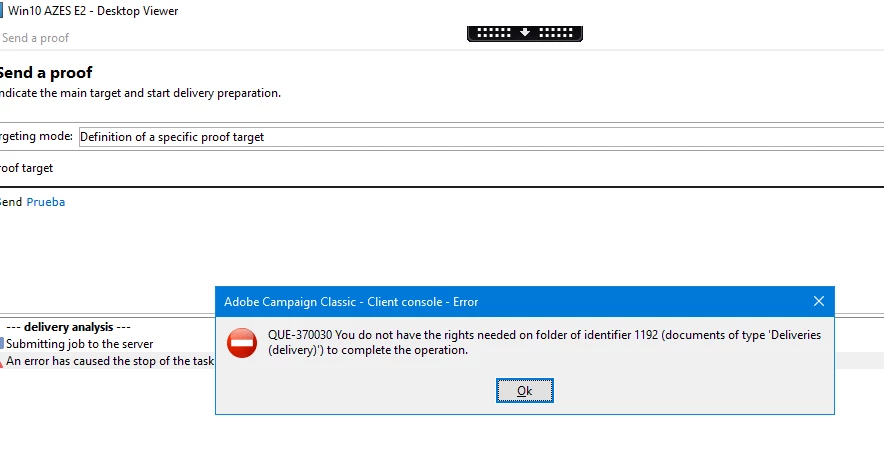
I am using Adobe Campaign Classic in a Client. When I configure an Email Delivery I get the error that I attach in the image. 
What they told us that we have all the permissions but I can't send a test. I followed the steps in the documentation but I still have the same status.

Can you tell me if I'm doing the configuration right?

Thanks.

This post is no longer active and is closed to new replies. Need help? Start a new post to ask your question.
Best answer by David_Loyd

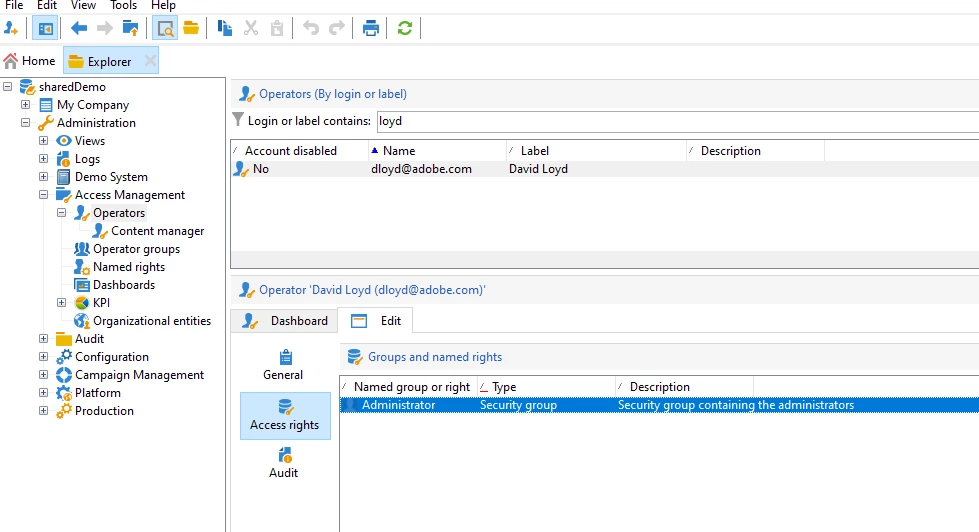
Below image would be the view to double check your operator profile has the correct configurations. I would start there to ensure your operator is set to the correct level. Or have your IT Admin prove to you with a screen shot that your operator has the correct settings. 


My profile (listed in the screen shot below) in my instance has the Admin level, so I have access to everything. 

But if you not an admin, you should have something called Delivery Rights.

This link describes how to enable delivery operators: https://experienceleague.adobe.com/docs/campaign-classic/using/getting-started/permissions/access-management-groups.html?lang=en


  1. Delivery operators

    The operators in this group are in charge of managing deliveries: they enable access to the main resources required for creating and preparing deliveries (campaign typologies, delivery mappings, default templates, personalization blocks, etc.).

    This group contains the following named rights:

    • PREPARE DELIVERIES: right to create, edit and start the delivery analysis,
    • START DELIVERIES: right to approve previously analyzed deliveries.


1 reply

David_Loyd
Adobe Employee
Adobe Employee
July 27, 2022

Try clearing the cache in the client.

Top left part of the window click File-> Clear the local cache. 

Once completed log out. then log back in. 

Try sending proof again.


If this doesn't work then get a screen shot of your operators rights and permissions. look for a Delivery named right. You need a Delivery named right or the Admin right on your operator.

Level 2
July 28, 2022
Hello,

I did the first part of clearing the cache and logging out but the error continues.


I don't understand your second suggestion. Can you tell me how to get there?

Cheers
David_Loyd
Adobe Employee
David_LoydAdobe EmployeeAccepted solution
Adobe Employee
July 28, 2022

Below image would be the view to double check your operator profile has the correct configurations. I would start there to ensure your operator is set to the correct level. Or have your IT Admin prove to you with a screen shot that your operator has the correct settings. 


My profile (listed in the screen shot below) in my instance has the Admin level, so I have access to everything. 

But if you not an admin, you should have something called Delivery Rights.

This link describes how to enable delivery operators: https://experienceleague.adobe.com/docs/campaign-classic/using/getting-started/permissions/access-management-groups.html?lang=en


  1. Delivery operators

    The operators in this group are in charge of managing deliveries: they enable access to the main resources required for creating and preparing deliveries (campaign typologies, delivery mappings, default templates, personalization blocks, etc.).

    This group contains the following named rights:

    • PREPARE DELIVERIES: right to create, edit and start the delivery analysis,
    • START DELIVERIES: right to approve previously analyzed deliveries.