Oct 16, 2020 1:26 PM UTC
Solved

Empty List

Hi Team,


Please let me know how can we empty the List after delivery activity.

We are updating the list with 3 days record so "Purge and re-use the list" checkbox is unchecked. 

Our goal is to empty the records in the list once delivery is performed.


Please help me with this.

Thanks in advance. 🙂

This post is no longer active and is closed to new replies. Need help? Start a new post to ask your question.
Darren_Bowers
Darren_BowersAccepted solution
Level 9
Nov 3, 2020 10:06 PM UTC

So am posting up the answer that helped @ritu21 

This is my actual workflow that does this:

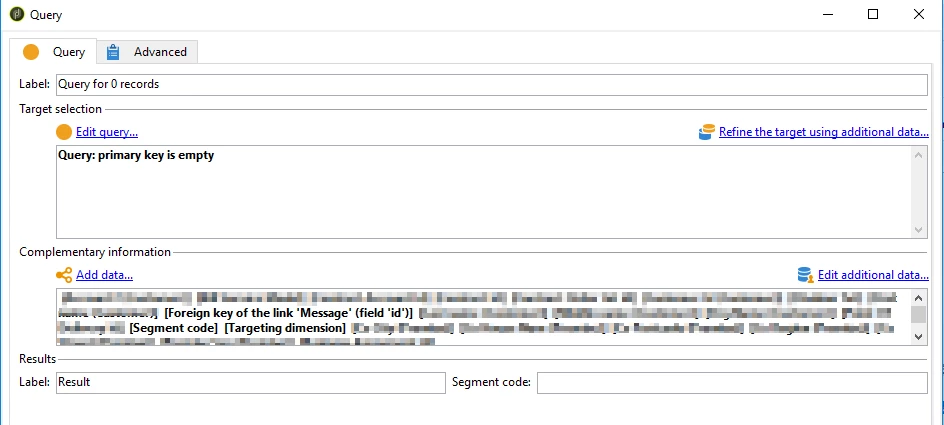
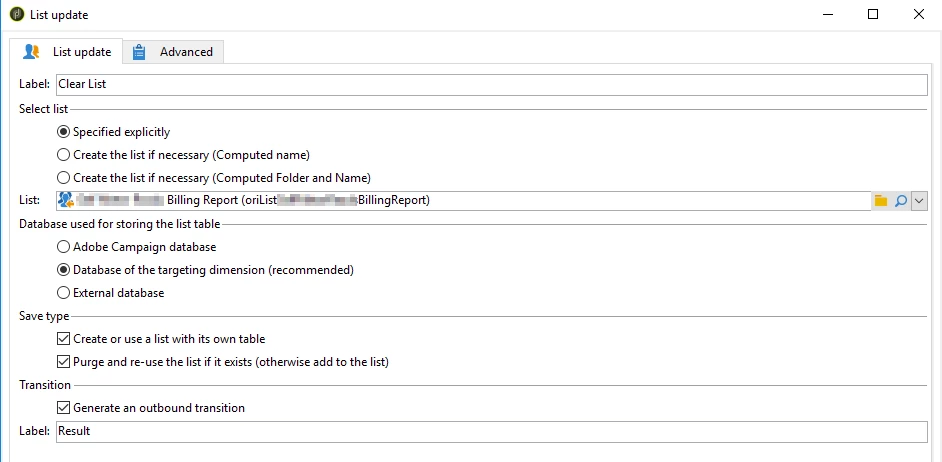
The first two steps are self-explanatory. The query is just querying the same record set for 0 records, but I also put all the additional data onto the schema that came off the schema when I first loaded it. I think this is so the new List has the exact same structure as the old list. Make sure you put the targeting dimension on there too.

Then I just save the new list as the same name as the old list

Cheers

Darren

8 replies

Jonathon_wodnicki
Community Advisor
Community Advisor
Oct 16, 2020 5:23 PM UTC

Hi,


Follow these steps:

  1. Create a workflow with external signal pointing to a js activity pointing to an end block
  2. In the js:
    1. Use nms.delivery.get(vars.deliveryId) to get the delivery contents
    2. Parse the contents for the target population's group id(s)
    3. Delete all the rows for group(s)
  3. Set the external account of the deliveries to use that workflow for post-processing


Might also be able to accomplish above without js, using $long(vars/@deliveryId) in a query activity; not so sure about parsing the target for the group id(s) without js though.


Thanks,

-Jon

Translate
Darren_Bowers
Level 9
Oct 19, 2020 10:45 PM UTC

Hi @ritu21 - the answer that @jonathon_wodnicki gave is definitely one way to do it. I found another easy way to do it - just query the List for 0 records then save the List again. It preserves the List schema and purges the list by saving 0 records to it. The query just asks for records where the primary key is empty and the Update List just has the Purge List checkbox ticked.


Translate
Ritu21Author
Oct 20, 2020 1:15 PM UTC

Hi Darren,

Thank you for the reply.


I tried to do that but getting 0 record.

filtered List internal name  and then added query primary key is empty. I am getting 0 records and didn't worked. Could you please let me know where I'm going wrong


Translate
Sukrity_Wadhwa
Level 4
Oct 26, 2020 4:30 AM UTC

Hi @ritu21,

Were you able to resolve this query with any of the given solutions? Do let us know.

Thanks!

Translate
Sukrity Wadhwa
Ritu21Author
Oct 28, 2020 9:22 AM UTC

Hi Sukrity,

Thank you for your concern.
I was unable to solve that.

Have asked for the same again.


Translate
Darren_Bowers
Darren_BowersAccepted solution
Level 9
Nov 3, 2020 10:06 PM UTC

So am posting up the answer that helped @ritu21 

This is my actual workflow that does this:

The first two steps are self-explanatory. The query is just querying the same record set for 0 records, but I also put all the additional data onto the schema that came off the schema when I first loaded it. I think this is so the new List has the exact same structure as the old list. Make sure you put the targeting dimension on there too.

Then I just save the new list as the same name as the old list

Cheers

Darren

Translate